# iNotify
**Repository Path**: Debugman/iNotify
## Basic Information
- **Project Name**: iNotify
- **Description**: JS 实现浏览器的 title 闪烁、滚动、声音提示、通知,没有依赖。https://github.com/jaywcjlove/iNotify
- **Primary Language**: JavaScript
- **License**: MIT
- **Default Branch**: master
- **Homepage**: http://jslite.oschina.io/inotify
- **GVP Project**: No
## Statistics
- **Stars**: 0
- **Forks**: 183
- **Created**: 2019-05-03
- **Last Updated**: 2024-06-06
## Categories & Tags
**Categories**: Uncategorized
**Tags**: None
## README
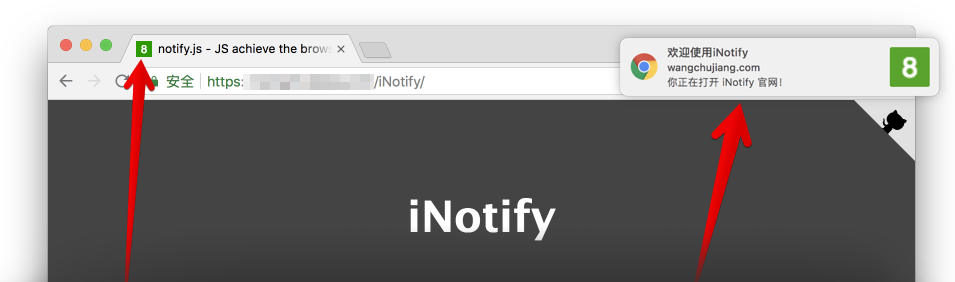


JS achieve the browser title flashing, scrolling, voice prompts, Chrome/Safari/FireFox/IE notice. has no dependencies. It not interfere with any JavaScript libraries or frameworks. has a reasonable footprint 5.05kb (gzipped: 1.75kb),Official document [demo preview](https://jaywcjlove.github.io/iNotify)。
## Installation
You will need Node.js installed on your system.
```bash
# v2.x
$ npm install @wcjiang/notify --save
# v1.x
$ npm install title-notify --save
```
## Using
```js
import Notify from '@wcjiang/notify';
const notify = new Notify({
message: '有消息了。', // page title.
effect: 'flash', // flash | scroll, Flashing or scrolling
openurl:'https://github.com/jaywcjlove/iNotify', // Click on the pop-up window to open the connection address
onclick: () => { // Click on the pop-up window trip event
console.log('---')
},
// Optional playback sound
audio:{
// You can use arrays to pass sound files in multiple formats.
file: ['msg.mp4','msg.mp3','msg.wav']
// The following is also work.
// file: 'msg.mp4'
},
// Title flashing, or scrolling speed
interval: 1000,
// Optional, default green background white text. Favicon
updateFavicon:{
// favicon font color
textColor: '#fff',
// Background color, set the background color to be transparent, set the value to "transparent"
backgroundColor: '#2F9A00'
},
// Optional chrome browser notifications,
// The default is not to fill in the following content
notification:{
title:'通知!', // Set notification title
icon:'', // Set notification icon, The default is Favicon
body:'您来了一条新消息', // Set message content
}
});
notify.player();
```
Or manually download and link **notify.js** in your HTML, It can also be downloaded via [UNPKG](https://unpkg.com/@wcjiang/notify/dist/):
```html
```
## option
- **message**: String, page title
- **effect**: String, flash | scroll | favicon, Flashing or scrolling
- **audio**: Optional playback sound
- **file**: String/Array, You can use arrays to pass sound files in multiple formats.
- **interval**: Number, Title flashing, or scrolling speed.
- **openurl**: String, Click on the pop-up window to open the connection address
- **onclick**: Function, Click on the pop-up window trip event
- **updateFavicon**: Optional, default green background white text. Favicon
- **textColor**: String, favicon font color.
- **backgroundColor**: Background color, set the background color to be transparent, set the value to "transparent"
- **notification**: Optional chrome browser notifications, The default is not to fill in the following content
- **title**: Set notification title `iNotify`
- **icon**: Set notification icon, The default is Favicon
- **body**: Set message content
## isPermission
Determine if the browser bulletin notification is blocked.
```js
iNotify.isPermission()
```
## Sound Settings
### player
Play sound.
```js
iNotify.player()
```
### loopPlay
Loop the sound.
```js
iNotify.loopPlay()
```
### stopPlay
Stop playing sound.
```js
iNotify.stopPlay()
```
### setURL
Set the playback sound URL.
```js
iNotify.setURL('msg.mp3') // Set one
iNotify.setURL(['msg.mp3','msg.ogg','msg.mp4']) // Set multiple
```
## title
The latest version does not play the title blinking animation by default. After initialization, you need to call the `setTitle(true)` method to play the title animation.
### setTitle
Set the title.
```js
iNotify.setTitle(true) // Play animation
iNotify.setTitle('New title') // Flashing new title
iNotify.setTitle() // Clear Blinking Show original title
```
### setInterval
Set time interval.
```js
iNotify.setInterval(2000)
```
### addTimer
Add counter
```js
iNotify.addTimer()
```
### clearTimer
Clear counter.
```js
iNotify.clearTimer()
```
## Favicon Notice
### setFavicon
Set `icon` to display numbers or text
```js
iNotify.setFavicon(10)
```
### setFaviconColor
Set `icon` display text color
```js
iNotify.setFaviconColor('#0043ff')
```
### setFaviconBackgroundColor
设置 icon 显示文本颜色
```js
iNotify.setFaviconBackgroundColor('#0043ff')
// 设置字体和背景颜色
iNotify.setFaviconColor('#f5ff00').setFaviconBackgroundColor('red');
```
### faviconClear
清除数字显示原来的icon
```js
iNotify.faviconClear()
```
## chrome通知
### notify
弹出chrome通知,不传参数为预设值...
```js
iNotify.notify();
iNotify.notify({
title: '新通知',
body: '打雷啦,下雨啦...',
openurl: 'http://www.bing.com',
onclick: function() {
console.log('on click')
},
onshow: function() {
console.log('on show')
},
});
```
- title 一定会被显示的通知标题。
- dir 文字的方向;它的值可以是 auto(自动), ltr(从左到右), or rtl(从右到左)。
- icon 一个图片的URL,将被用于显示通知的图标。
- body 通知中额外显示的字符串。
- openurl 点击打开指定 URL。
- onclick 每当用户点击通知时被触发。
- onshow 当通知显示的时候被触发。
- onerror 每当通知遇到错误时被触发。
- onclose 当用户关闭通知时被触发。
## 其它
`iNotify.init().title;` 获取标题
## Example
### Example 1
```js
function iconNotify(num){
if(!notify) {
var notify = new Notify({
effect: 'flash',
interval: 500
});
}
if(num===0){
notify.faviconClear()
notify.setTitle();
} else if (num < 100){
notify.setFavicon(num)
notify.setTitle('有新消息!');
} else if (num > 99){
notify.setFavicon('..')
notify.setTitle('有新消息!');
}
}
```
### Example 2
```js
var notify = new Notify({
effect: 'flash',
interval: 500,
});
notify.setFavicon('1');
```
### Example 3
```js
var iN = new Notify({
effect: 'flash',
interval: 500,
message: '有消息拉!',
updateFavicon:{ // 可选,默认绿底白字
textColor: '#fff',// favicon 字体颜色
backgroundColor: '#2F9A00', // 背景颜色
}
}).setFavicon(10);
```
### Example 4
```js
var iN = new Notify().setFavicon(5);
```
### Example 5
```js
var iN = new Notify({
effect: 'flash',
interval: 500,
message: "有消息拉!",
audio:{
file: 'msg.mp4',
}
}).setFavicon(10).player();
```
### Example 6
```js
var iN = new Notify({
effect: 'flash',
interval: 500,
message: '有消息拉!',
audio:{
file: 'msg.mp4'//可以使用数组传多种格式的声音文件
},
notification:{
title: '通知!',
icon: '',
body: '您来了一条新消息'
}
}).setFavicon(10).player();
//弹出chrome通知,不传参数为预设值...
iN.notify();
iN.notify({
title: '新通知',
body: '打雷啦,下雨啦...'
});
```
### Example 7
```js
var iN = new Notify({
effect: 'flash',
interval: 500,
message: '有消息拉!',
audio:{
file: ['msg.mp4', 'msg.mp3', 'msg.wav']
},
notification:{
title: '通知!',
body:'您来了一条新消息'
}
})
iN.setFavicon(10).player();
var n = new Notify()
n.init({
effect: 'flash',
interval: 500,
message: '有消息拉!',
audio:{
file: ['openSub.mp4', 'openSub.mp3', 'openSub.wav'],
},
notification:{
title:'通知!',
icon: '',
body:'您来了一个客户',
}
})
n.setFavicon(10).player();
```
## License
[MIT © Kenny Wong](./MIT-LICENSE)