# DissolveEffectForUGUI
**Repository Path**: FREEstriker-Space/DissolveEffectForUGUI
## Basic Information
- **Project Name**: DissolveEffectForUGUI
- **Description**: A dissolve effect for uGUI, without material instancing. Please star and watch this project :)
- **Primary Language**: Unknown
- **License**: MIT
- **Default Branch**: master
- **Homepage**: None
- **GVP Project**: No
## Statistics
- **Stars**: 0
- **Forks**: 0
- **Created**: 2019-09-16
- **Last Updated**: 2020-12-19
## Categories & Tags
**Categories**: Uncategorized
**Tags**: None
## README
DissolveEffectForUGUI
===
### NOTE: This project has been merged to [UIEffect](https://github.com/mob-sakai/UIEffect).
A dissolve effect for uGUI, without material instancing.

[](https://github.com/mob-sakai/DissolveEffectForUGUI/release)
[](https://github.com/mob-sakai/DissolveEffectForUGUI/releases)

[](https://github.com/mob-sakai/DissolveEffectForUGUI/blob/master/LICENSE.txt)
[](https://github.com/mob-sakai/DissolveEffectForUGUI/commits/develop)
[](https://github.com/mob-sakai/DissolveEffectForUGUI/issues)
[](https://github.com/mob-sakai/DissolveEffectForUGUI/compare/master...develop)
<< [Description](#Description) | [Demo](#demo) | [Download](https://github.com/mob-sakai/DissolveEffectForUGUI/releases) | [Usage](#usage) | [Development Note](#development-note) | [Change log](https://github.com/mob-sakai/DissolveEffectForUGUI/blob/develop/CHANGELOG.md) >>
## Description

DissolveEffectForUGUI applies _dissolve-effect_ to uGUI element (Image, RawImage, Text, etc...) **WITHOUT material instancing**.
This will suppress extra draw calls and improve performance.
* Parameters
* Dissolve factor (inspector, script, animation)
* Edge width (inspector, script, animation)
* Edge color (inspector, script, animation)
* Edge softness (inspector, script, animation)
* Noise pattern image (in material)
### New feature in v0.4.0
From [UIEffect v2.4.0](https://github.com/mob-sakai/UIEffect)

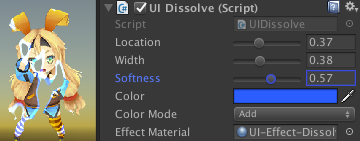
* UIDissolve: Add color mode option.
* UIDissolve: You can change the edge color, width, softness, color mode in inspector.
## Demo
* 
* Just 1 draw call!
[WebGL Demo](http://mob-sakai.github.io/DissolveEffectForUGUI)
## Usage
1. Download DissolveEffectForUGUI.unitypackage from [Releases](https://github.com/mob-sakai/DissolveEffectForUGUI/releases).
1. Import the package into your Unity project. Select `Import Package > Custom Package` from the `Assets` menu.
1. Add `DissolveEffectForUGUI` component to UI element (Image, RawImage, Text, etc...) from `Add Component` in inspector.
1. Control effect parameters in inspector.
1. Enjoy!
##### Requirement
* Unity 5.5+ *(included Unity 2017.x)*
* No other SDK are required
## Development Note
#### What's doing?
* Control effect parameters for uGUI element WITHOUT MaterialPropertyBlock
* https://github.com/mob-sakai/UIEffect#how-to-control-effect-parameters-for-ugui-element-without-materialpropertyblock
## License
* MIT
* [JewelSaviorFREE](http://www.jewel-s.jp/)
## Author
[mob-sakai](https://github.com/mob-sakai)
## See Also
* GitHub page : https://github.com/mob-sakai/DissolveEffectForUGUI
* Releases : https://github.com/mob-sakai/DissolveEffectForUGUI/releases
* Issue tracker : https://github.com/mob-sakai/DissolveEffectForUGUI/issues
* Current project : https://github.com/mob-sakai/DissolveEffectForUGUI/projects/1
* Change log : https://github.com/mob-sakai/DissolveEffectForUGUI/blob/master/CHANGELOG.md