# dompdf2.js
**Repository Path**: aisajan/dompdf2.js
## Basic Information
- **Project Name**: dompdf2.js
- **Description**: No description available
- **Primary Language**: Unknown
- **License**: MIT
- **Default Branch**: main
- **Homepage**: None
- **GVP Project**: No
## Statistics
- **Stars**: 0
- **Forks**: 0
- **Created**: 2026-04-23
- **Last Updated**: 2026-04-23
## Categories & Tags
**Categories**: Uncategorized
**Tags**: None
## README
# dompdf.js
[English](./README.md) | [中文](./README_CN.md)
This script allows you to generate editable, non-image, printable vector PDFs directly on the user's browser from web pages or parts of web pages. It supports pagination and can generate PDF files with thousands of pages. Since the generation is based on the DOM, the result may not be 100% consistent with the actual appearance. It is not recommended for complex PDF generation requirements.
Live Demo: [Online Demo](https://dompdfjs.lisky.com.cn)
### PDF Generation Example

### 🛠️ How it works
This script is based on [html2canvas](https://github.com/niklasvh/html2canvas) and [jspdf](https://github.com/MrRio/jsPDF). Unlike traditional methods that render HTML pages to images via html2canvas and then generate PDF files from images via jspdf, this script modifies the canvas-renderer file of html2canvas by reading the DOM and styles applied to elements, and calls jspdf methods to generate PDF files.
Therefore, it has the following advantages:
1. No server-side rendering is required because the entire PDF is created on the **client-side browser**.
2. It generates real PDF files, not image-based ones, so the quality of the generated PDF is higher, and you can edit and print the generated PDF files.
3. Smaller PDF file size.
4. Not limited by canvas rendering height, allowing for the generation of PDF files with thousands of pages.
Of course, it also has some disadvantages:
1. Since it is based on the DOM, it may not be 100% consistent with the actual appearance.
2. Some CSS properties are not yet supported. See [Supported CSS Properties](https://www.html2canvas.cn/html2canvas-features.html).
### Implemented Features
| Feature | Status | Description |
| :----------------- | :----- | :------------------------------------------------------------------------------------------------------------------------------------------------------- |
| Pagination | ✅ | Supports PDF pagination rendering, capable of generating PDF files with thousands of pages |
| Text Rendering | ✅ | Supports basic text content rendering, font-family, font-size, font-style, font-variant, color, etc., supports text stroke, does not support text shadow |
| Image Rendering | ✅ | Supports web images, base64 images, svg images |
| Borders | ✅ | Supports border-width, border-color, border-style, border-radius, currently only solid borders are implemented |
| Background | ✅ | Supports background color, background image, background gradient |
| Canvas | ✅ | Supports rendering canvas |
| SVG | ✅ | Supports rendering svg |
| Shadow Rendering | ✅ | Uses foreignObjectRendering, supports border shadow rendering |
| Gradient Rendering | ✅ | Uses foreignObjectRendering, supports background gradient rendering |
| Iframe | ❌ | Does not support rendering iframe yet |
### Usage
The dompdf library uses `Promise` and expects them to be available in the global context. If you wish to support [older browsers](http://caniuse.com/#search=promise) that do not natively support `Promise`, please include a polyfill, such as [es6-promise](https://github.com/jakearchibald/es6-promise), before importing `dompdf`.
Installation:
npm install dompdf.js --save
CDN Import:
```html
```
#### Basic Usage
```js
import dompdf from 'dompdf.js';
dompdf(document.querySelector('#capture'), options)
.then((blob) => {
const url = URL.createObjectURL(blob);
const a = document.createElement('a');
a.href = url;
a.download = 'example.pdf';
document.body.appendChild(a);
a.click();
})
.catch((err) => {
console.error(err);
});
```
#### PDF Pagination Rendering
By default, dompdf renders the entire document onto a single page.
You can enable pagination rendering by setting the `pagination` option to `true`. Customize header and footer size, content, font color/size, position, etc., via the pageConfig field.
**_ Note: Please ensure that the DOM node to be generated as PDF is set to the corresponding page width (px). For example, set the width to 794px for A4. Here is the page size reference table: [page_sizes.md](./page_sizes.md) _**
```js
import dompdf from 'dompdf.js';
dompdf(document.querySelector('#capture'), {
pagination: true,
format: 'a4',
pageConfig: {
header: {
content: 'This is the header',
height: 50,
contentColor: '#333333',
contentFontSize: 12,
contentPosition: 'center',
padding: [0, 0, 0, 0]
},
footer: {
content: 'Page ${currentPage} of ${totalPages}',
height: 50,
contentColor: '#333333',
contentFontSize: 12,
contentPosition: 'center',
padding: [0, 0, 0, 0]
}
}
})
.then((blob) => {
const url = URL.createObjectURL(blob);
const a = document.createElement('a');
a.href = url;
a.download = 'example.pdf';
document.body.appendChild(a);
a.click();
})
.catch((err) => {
console.error(err);
});
```
##### Precise Pagination Control - `divisionDisable` Attribute
If you do not want a container to be split during pagination, add the `divisionDisable` attribute to that element, and it will be moved to the next page entirely when crossing pages.
##### Force Rendering From the Next Page - `pageBreak` Attribute
If you want an element to skip the current page and start rendering from the next page, add the `pageBreak` attribute to that element. Once triggered, that element and the content that follows it continue layout with the new pagination offset.
```html
This block starts rendering from the next page.
```
#### ⚙️ options Parameters
| Parameter | Required | Default | Type | Description |
| :----------------- | :------- | :--------- | :----------------------- | :-------------------------------------------------------------------------------------------------------------------------------------------------------------------------------------------------------------------------------------------------------------------------------------------------------------------------------------------------------- |
| `useCORS` | No | `false` | `boolean` | Allow cross-origin resources (requires server-side CORS configuration) |
| `backgroundColor` | No | Auto/White | `string \| null` | Override page background color; pass `null` to generate transparent background |
| `fontConfig` | No | - | `object \| Array` | Non-English font configuration, see table below |
| `encryption` | No | Empty | `object` | PDF encryption configuration. Property `userPassword` is used for the user password under the given permission list; property `ownerPassword` needs userPassword and ownerPassword to be set for correct authentication; property `userPermissions` is used to specify user permissions, optional values are `['print', 'modify', 'copy', 'annot-forms']` |
| `precision` | No | `16` | `number` | Element position precision |
| `compress` | No | `false` | `boolean` | Whether to compress PDF |
| `putOnlyUsedFonts` | No | `false` | `boolean` | Embed only actually used fonts into PDF |
| `pagination` | No | `false` | `boolean` | Enable pagination rendering |
| `format` | No | `'a4'` | `string` | Page size, supports `a0–a10`, `b0–b10`, `c0–c10`, `letter`, etc. |
| `pageConfig` | No | See below | `object` | Header and footer configuration |
| `onJspdfReady` | No | `` | `Function(jspdf: jsPDF)` | jspdf instance initialization |
| `onJspdfFinish` | No | `` | `Function(jspdf: jsPDF)` | jspdf instance finished drawing PDF |
##### `pageConfig` Fields:
| Parameter | Default | Type | Description |
| :-------- | :-------------------------- | :----- | :-------------- |
| `header` | See pageConfigOptions below | object | Header settings |
| `footer` | See pageConfigOptions below | object | Footer settings |
##### `pageConfigOptions` Fields:
| Parameter | Default | Type | Description |
| :---------------- | :------------------------------------------------------------------------ | :--------------------------------- | :--------------------------------------------------------------------------------------------------------------------------------------------------------------- |
| `content` | Header default is empty, footer default is `${currentPage}/${totalPages}` | `string \| Function` | Text content, supports `${currentPage}`, `${totalPages}` placeholders. Can also be a function `(renderer, pageNum) => void` for custom drawing using jsPDF API |
| `height` | `50` | `number` | Area height (px) |
| `contentPosition` | `'center'` | `string \| [number, number]` | Text position enum `center`, `centerLeft`, `centerRight`, `centerTop`, `centerBottom`, `leftTop`, `leftBottom`, `rightTop`, `rightBottom` or coordinates `[x,y]` |
| `contentColor` | `'#333333'` | `string` | Text color |
| `contentFontSize` | `16` | `number` | Text font size (px) |
| `padding` | `[0,24,0,24]` | `[number, number, number, number]` | Top/Right/Bottom/Left padding (px) |
##### Font Configuration (`fontConfig`) Fields:
| Field | Required | Default | Type | Description |
| :----------- | :-------------------------------- | :------ | :------------------------ | :----------------------------------------------------------------------------------------------- |
| `fontFamily` | Yes (when using custom font) | `''` | `string` | Font family name (same as injected `.ttf`) |
| `fontBase64` | Yes (when using custom font) | `''` | `string` | Base64 string content of `.ttf` |
| `fontStyle` | Yes (when using custom font) | `''` | `'normal' \| 'italic'` | Font style: `normal` for upright, `italic` for italic |
| `fontWeight` | Yes (when using custom font bold) | `''` | `400 \| 700` | Font weight: `400` for normal, `700` for bold |
| `iconFont` | No | `false` | `boolean` | Whether this is an icon font |
#### 🔣 Garbled Characters - Font Import Support
Since jspdf only supports English, other languages will appear as garbled characters, requiring the import of corresponding font files to resolve. If you need custom fonts, convert the font tff file to a base64 format js file [here](https://github.com/lmn1919/dompdf.js/tree/main/fontconverter). For Chinese fonts, [Source Han Sans](https://github.com/lmn1919/dompdf.js/blob/main/examples/SourceHanSansSC-Normal-Min-normal.js) is recommended due to its smaller size.
Import the file in the code.
> **Note: Importing fonts will increase the final PDF file size. If there are requirements for the final PDF size, it is recommended to streamline the font, you can remove unnecessary fonts. Or use tools like `Fontmin` to slim down the font.**
```js
```
#### 🌍 Multi-Language Font Support - `langFontConfig`
> **⚠️ Warning: Do not mix `fontConfig` and `langFontConfig`. If both are configured, `langFontConfig` will completely override `fontConfig`, and `fontConfig` will be ignored.**
For mixed-language scenarios (Chinese, English, Arabic, Japanese, Korean, etc.), if you want precise control over each character, use `langFontConfig` for character-by-character font matching:
```js
dompdf(element, {
langFontConfig: [
{
fontFamily: 'Roboto',
fontBase64: window.robotoNormal,
fontWeight: 400,
fontStyle: 'normal',
isDefault: true // Default fallback font
},
{
fontFamily: 'Roboto',
fontBase64: window.robotoBold,
fontWeight: 700,
fontStyle: 'normal',
isDefault: true
},
// Chinese font - specify CJK character range
{
fontFamily: 'NotoSansSC',
fontBase64: window.notoSansSCNormal,
fontWeight: 400,
fontStyle: 'normal',
charRange: [
[0x4E00, 0x9FFF], // CJK Unified Ideographs
[0x3000, 0x303F], // CJK Symbols and Punctuation
[0xFF00, 0xFFEF], // Fullwidth ASCII and Fullwidth Forms
[0x2190, 0x21FF] // Arrows
]
},
{
fontFamily: 'NotoSansSC',
fontBase64: window.notoSansSCBold,
fontWeight: 700,
fontStyle: 'normal',
charRange: [[0x4E00, 0x9FFF], [0x3000, 0x303F], [0xFF00, 0xFFEF]]
}
]
});
```
##### Lang Font Configuration (`langFontConfig`) Fields:
| Field | Required | Default | Type | Description |
| :----------- | :-------------------------------- | :------ | :------------------------ | :----------------------------------------------------------------------------------------------- |
| `fontFamily` | Yes | `''` | `string` | Font family name (same as injected `.ttf`) |
| `fontBase64` | Yes | `''` | `string` | Base64 string content of `.ttf` |
| `fontStyle` | Yes | `''` | `'normal' \| 'italic'` | Font style: `normal` for upright, `italic` for italic |
| `fontWeight` | Yes | `''` | `400 \| 700` | Font weight: `400` for normal, `700` for bold |
| `charRange` | No | - | `[number, number][]` | Unicode character ranges this font handles, e.g., `[[0x4E00, 0x9FFF]]` for Chinese CJK |
| `isDefault` | No | `false` | `boolean` | Mark as default fallback font for characters not matching any `charRange` |
**How it works**:
- The library automatically selects fonts based on character Unicode values
- Fonts with `charRange` are matched first (e.g., Chinese characters use Chinese fonts)
- If no `charRange` matches, fonts marked with `isDefault: true` are used as fallback
- If `isDefault` is also not available, jsPDF's native Helvetica font is used (Chinese characters will be garbled)
- `fontWeight` and `fontStyle` determine which font variant to use (normal/bold/italic)
#### 🎨 Rendering Complex Styles like Gradients, Shadows - Using foreignObjectRendering
In cases where the DOM is very complex or the PDF cannot be drawn (e.g., complex tables, border shadows, gradients, etc.), consider using foreignObjectRendering.
Add the foreignObjectRendering attribute to the element to be rendered, and it will be rendered as a background image inserted into the PDF file via svg's foreignObject.
However, since the rendering of foreignObject elements depends on the browser's implementation, it may behave differently in different browsers.
Therefore, when using foreignObjectRendering, please note the following:
1. The rendering of foreignObject elements depends on the browser's implementation, so it may behave differently in different browsers.
2. IE browser does not support it at all, recommended to use in Chrome, Firefox, Edge.
3. The generated image will increase the PDF file size.
Example
```html
```
### 🌐 Browser Compatibility
The library should work properly on the following browsers (requires `Promise` polyfill):
- Firefox 3.5+
- Google Chrome
- Opera 12+
- IE9+
- Safari 6+
### 🏗️ Build
Clone git repository:
$ git clone git@github.com:lmn1919/dompdf.js.git
Install dependencies:
$ npm install
Build browser package:
$ npm run build
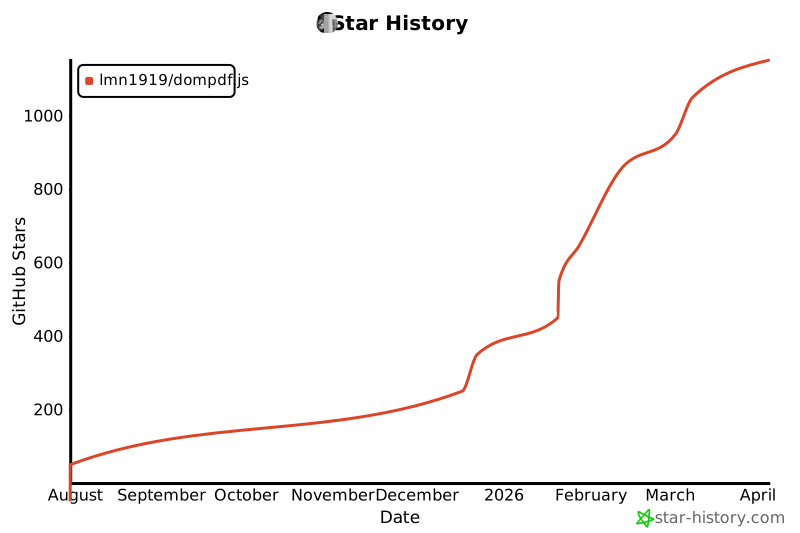
## 📈 Star History
[](https://www.star-history.com/#lmn1919/dompdf.js&Date)