# TCP_server_TCP_client
**Repository Path**: brucehho/TCP_server_TCP_client
## Basic Information
- **Project Name**: TCP_server_TCP_client
- **Description**: tcp server and tcp client.
- **Primary Language**: C++
- **License**: Not specified
- **Default Branch**: main
- **Homepage**: None
- **GVP Project**: No
## Statistics
- **Stars**: 1
- **Forks**: 2
- **Created**: 2021-07-17
- **Last Updated**: 2023-04-21
## Categories & Tags
**Categories**: Uncategorized
**Tags**: None
## README
# TCP server and TCP client.
A application like an internet live chat room.
We need two programs **client** and **server**: a client program for users to use to send and receive messages from other users. A server program that connects all clients and delivers their messages.
In **client** application needed a visually enjoyable and easy to use GUI for user to read and compose their messages. Therefore the client application as a Qt widgets application. It simply connects the server, sends the messages entered by the user, and prints out everything that the server sends to it.
The **server** application just handles everything silently behind the scenes, it doesn’t need any user interface, so we only need it as a Qt console application.
## TCP server:
TCP networking is typically used for programs that require every piece of data to be sent and received in sequence. It also ensures that the client receives the data and sends a notification to the server.
 ## TCP client:
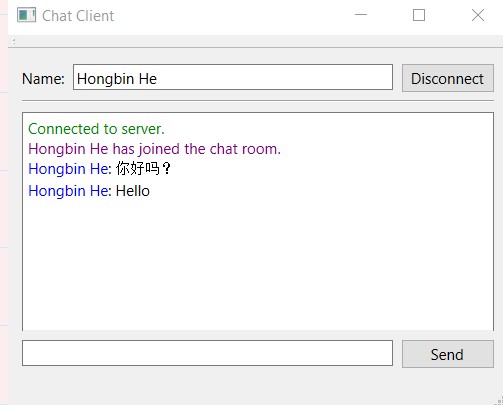
Before we can run the client program, we must first run the server program that we created. Then build and run the client program. After opening the program, click on the "Connect" button. After successfully connecting to the server, type a word in the edit widget located at the bottom and press the send button. This time the display window will appear with the word you wrote.
## TCP client:
Before we can run the client program, we must first run the server program that we created. Then build and run the client program. After opening the program, click on the "Connect" button. After successfully connecting to the server, type a word in the edit widget located at the bottom and press the send button. This time the display window will appear with the word you wrote.
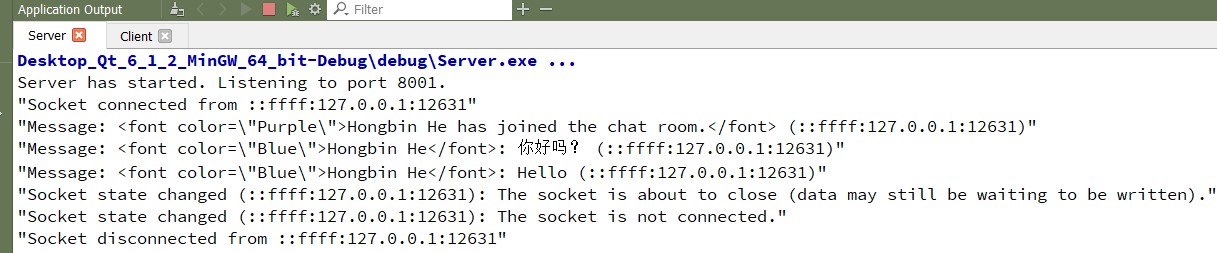
 Go to the server program to check if anything printed on the **terminal window**.
 ```
QT += network
```
```
// qtcp module.
#include
#include
#include
#include
```
```
//declare startServer() and sendMessageToClients() functions
//in the public of the class:
void startServer();
void sendMessageToClients(QString message);
```
```
// declare the slot functions
//declare 2 private variable
```
In main.cpp
```
server* myServer = new server();
myServer->startServer();
```
In server.cpp:
```
// create a QVector container to store all the clients that are connected to the server.
//Send the message to each of them
//iterate through the all clients container.
//newClientConnection()
//when a client has been disconnected from the server
//be triggered when the client sends a text message to the server.
//Implement the socketStateChanged(), which will be called when the client's network state changes.
//And convert the code to socketStateChanged() to display the client's state.
```
In Client:
```
private slots:
//The slots set in the ui.
void on_connectButton_clicked();
void on_sendButton_clicked();
//Add your own slots ()
void socketConnected();
void socketDisconnected();
void socketReadyRead();
```
```
//declare variables!
bool connectedToHost = false;
QTcpSocket* socket;
```
```
//define the printMessage() by your own
void MainWindow::printMessage(QString message)
{
ui->chatDisplay->append(message);
}
```
```
// on_connectBtton_clicked() will be triggered when the connec button is clicked.
//when the Send button has been clicked
// will be called when the client successfully connects to the server.
//socketDiconnected() will be triggered when the client disconnects from the server.
//prints out the message sent from the server.
```
```
QT += network
```
```
// qtcp module.
#include
#include
#include
#include
```
```
//declare startServer() and sendMessageToClients() functions
//in the public of the class:
void startServer();
void sendMessageToClients(QString message);
```
```
// declare the slot functions
//declare 2 private variable
```
In main.cpp
```
server* myServer = new server();
myServer->startServer();
```
In server.cpp:
```
// create a QVector container to store all the clients that are connected to the server.
//Send the message to each of them
//iterate through the all clients container.
//newClientConnection()
//when a client has been disconnected from the server
//be triggered when the client sends a text message to the server.
//Implement the socketStateChanged(), which will be called when the client's network state changes.
//And convert the code to socketStateChanged() to display the client's state.
```
In Client:
```
private slots:
//The slots set in the ui.
void on_connectButton_clicked();
void on_sendButton_clicked();
//Add your own slots ()
void socketConnected();
void socketDisconnected();
void socketReadyRead();
```
```
//declare variables!
bool connectedToHost = false;
QTcpSocket* socket;
```
```
//define the printMessage() by your own
void MainWindow::printMessage(QString message)
{
ui->chatDisplay->append(message);
}
```
```
// on_connectBtton_clicked() will be triggered when the connec button is clicked.
//when the Send button has been clicked
// will be called when the client successfully connects to the server.
//socketDiconnected() will be triggered when the client disconnects from the server.
//prints out the message sent from the server.
```