# mac-cleaner-cli
**Repository Path**: duzengqiang/mac-cleaner-cli
## Basic Information
- **Project Name**: mac-cleaner-cli
- **Description**: No description available
- **Primary Language**: Unknown
- **License**: MIT
- **Default Branch**: main
- **Homepage**: None
- **GVP Project**: No
## Statistics
- **Stars**: 0
- **Forks**: 0
- **Created**: 2026-06-19
- **Last Updated**: 2026-06-19
## Categories & Tags
**Categories**: Uncategorized
**Tags**: None
## README
# mac-cleaner-cli
Free up disk space on macOS with a single command. Removes caches, logs, Homebrew leftovers, Xcode DerivedData, and junk files — all from your terminal.
No subscription. No telemetry. No bloatware.








🪟 Also available for Windows: windows-cleaner-cli
---
## ⚡ Quick Start
```bash
npx mac-cleaner-cli
```
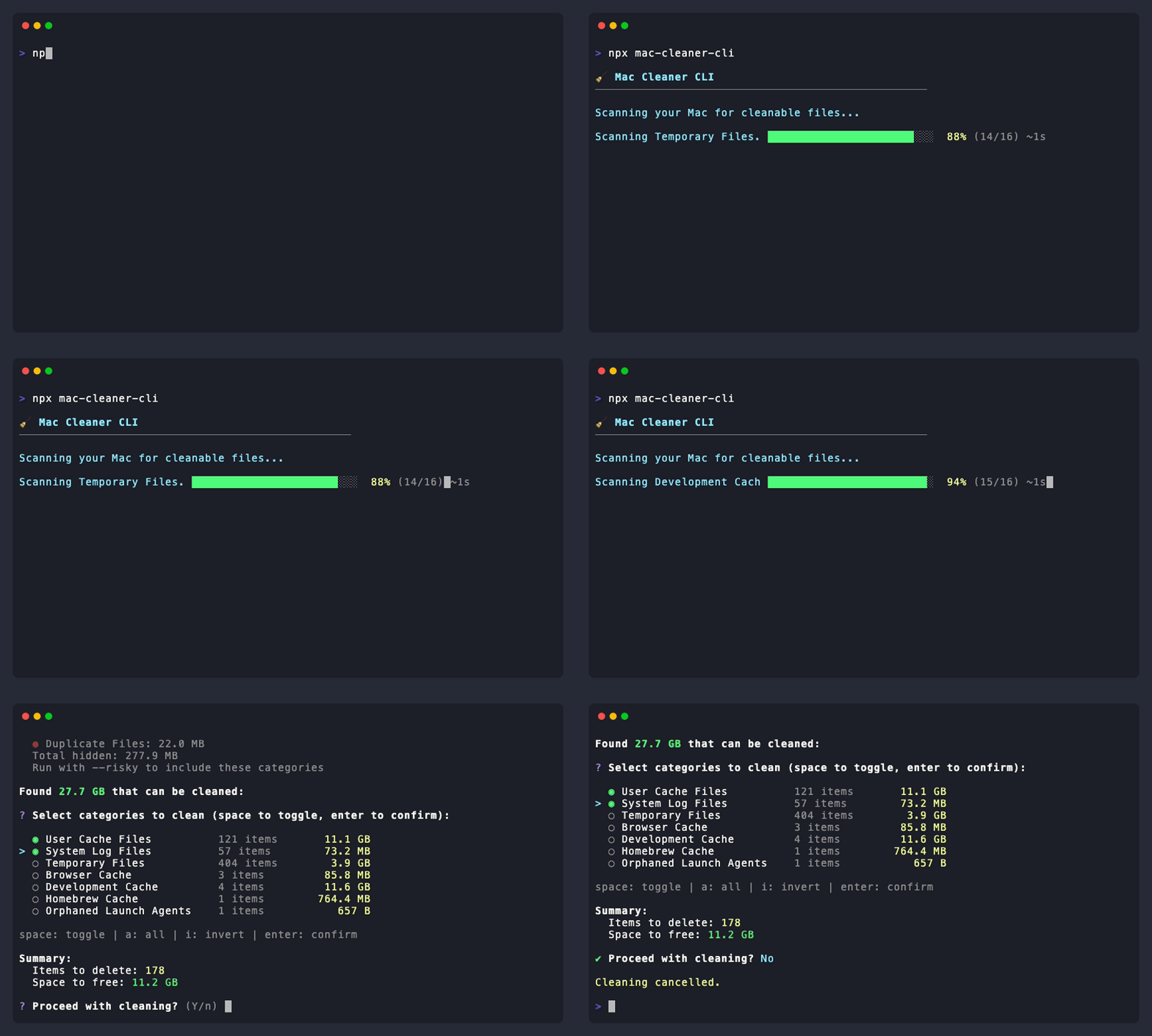
That's it. No installation needed. The CLI will:
1. 🔍 **Scan** your Mac for cleanable files
2. 📋 **Show** you what was found with sizes
3. ✅ **Let you select** exactly what to clean
4. 🗑️ **Clean** only what you chose
## 🎬 See It In Action
## ✨ Features
| Feature | Description |
|---------|-------------|
| 🚀 **One Command** | Just run `npx mac-cleaner-cli` — no complex setup |
| 🎯 **Interactive** | Select exactly what you want to clean with checkboxes |
| 📁 **File Explorer** | Drill down (`→`) into categories to select specific folders/files |
| 🛡️ **Safe by Default** | Risky items hidden unless you use `--risky` |
| 🔍 **Smart Scanning** | Finds caches, logs, dev files, browser data, and more |
| 📱 **App Uninstaller** | Remove apps completely with all associated files |
| 🔧 **Maintenance** | Flush DNS cache, free purgeable space |
| 🔒 **Privacy First** | 100% offline — no data ever leaves your machine |
| 📦 **Minimal Dependencies** | Only 5 runtime deps, all from trusted maintainers |
## 💰 vs. Paid Alternatives
| | Mac Cleaner CLI | CleanMyMac X | DaisyDisk |
|---|---|---|---|
| **Price** | **Free** | $39.95/year | $9.99 one-time |
| **Open Source** | ✅ | ❌ | ❌ |
| **Telemetry / Analytics** | ❌ None | ⚠️ Yes | ⚠️ Yes |
| **Works via terminal** | ✅ | ❌ | ❌ |
| **CI/CD friendly** | ✅ | ❌ | ❌ |
| **Customizable** | ✅ Fork it | ❌ | ❌ |
| **App Uninstaller** | ✅ | ✅ | ❌ |
| **File-level selection** | ✅ | ✅ | ✅ |
## 🎯 What It Cleans
### 🟢 Safe (always safe to delete)
| Category | What it cleans |
|----------|---------------|
| `trash` | Files in the Trash bin |
| `temp-files` | Temporary files in /tmp and /var/folders |
| `browser-cache` | Chrome, Safari, Firefox, Arc cache |
| `homebrew` | Homebrew download cache |
| `docker` | Unused Docker images, containers, volumes |
### 🟡 Moderate (generally safe)
| Category | What it cleans |
|----------|---------------|
| `system-cache` | Application caches in ~/Library/Caches |
| `system-logs` | System and application logs |
| `dev-cache` | npm, yarn, pip, Xcode DerivedData, CocoaPods |
| `node-modules` | Orphaned node_modules in old projects |
### 🔴 Risky (use `--risky` flag)
| Category | What it cleans |
|----------|---------------|
| `downloads` | Downloads older than 30 days |
| `ios-backups` | iPhone and iPad backup files |
| `mail-attachments` | Downloaded email attachments |
| `duplicates` | Duplicate files (keeps newest) |
| `large-files` | Files larger than 500MB |
| `language-files` | Unused language localizations |
## 📖 Usage
### Basic Usage
```bash
# Interactive mode — scan, select, and clean
npx mac-cleaner-cli
# Include risky categories
npx mac-cleaner-cli --risky
# Enable file picker for all categories
npx mac-cleaner-cli --risky -f
```
### Folder-Level Selection (Interactive)
In interactive mode, press `→` on supported categories to drill into specific folders/files:
- `↑↓` navigate • `←` back • `→` enter • `space` select • `a` all • `i` invert • `⏎` submit
Supported categories: User Cache Files, Temporary Files, System Log Files, Development Cache, Browser Cache, Homebrew Cache.
### Uninstall Apps
Remove applications completely with all their preferences, caches, and support files:
```bash
npx mac-cleaner-cli uninstall
```
### Maintenance Tasks
```bash
# Flush DNS cache (may require sudo)
npx mac-cleaner-cli maintenance --dns
# Free purgeable space
npx mac-cleaner-cli maintenance --purgeable
```
### Other Commands
```bash
# List all available categories
npx mac-cleaner-cli categories
# Manage configuration
npx mac-cleaner-cli config --init
npx mac-cleaner-cli config --show
# Manage backups
npx mac-cleaner-cli backup --list
npx mac-cleaner-cli backup --clean
```
### Flags
```bash
-V, --version Show version number
-h, --help Show help
-r, --risky Include risky categories
-f, --file-picker Force file picker for ALL categories
-A, --absolute-paths Show absolute paths
--no-progress Disable progress bars
```
## 💻 Global Installation
If you use this tool frequently:
```bash
npm install -g mac-cleaner-cli
mac-cleaner-cli
```
## 🔒 Security
| | |
|---|---|
| ✅ **Open Source** | All code publicly available for audit |
| ✅ **No Network** | Operates 100% offline |
| ✅ **No Root Required** | All operations run as current user |
| ✅ **Minimal Deps** | Only 5 runtime dependencies |
| ✅ **CI/CD** | Every release tested with TypeScript, ESLint, and automated tests |
| ✅ **Socket.dev** | Dependencies monitored for supply chain attacks |
Found a vulnerability? Report it via [GitHub Security Advisories](https://github.com/guhcostan/mac-cleaner-cli/security/advisories/new).
## 🛠️ Development
```bash
git clone https://github.com/guhcostan/mac-cleaner-cli.git
cd mac-cleaner-cli
bun install
bun run dev # Run in dev mode
bun run test # Run tests
bun run lint # Run linter
bun run build # Build for production
```
## 🤝 Contributing
Contributions are very welcome! Whether it's a new scanner, a bug fix, or a documentation improvement — we'd love your help.
**Read the full guide:** [CONTRIBUTING.md](CONTRIBUTING.md)
Quick steps:
1. Fork the repo
2. Create your branch: `git checkout -b feat/my-feature`
3. Make your changes and add tests
4. Run `bun run lint && bun run test`
5. Open a Pull Request
Looking for a place to start? Check issues labeled [`good first issue`](https://github.com/guhcostan/mac-cleaner-cli/labels/good%20first%20issue) or [`help wanted`](https://github.com/guhcostan/mac-cleaner-cli/labels/help%20wanted).
## 💬 Community
- [GitHub Discussions](https://github.com/guhcostan/mac-cleaner-cli/discussions) — questions, ideas, show & tell
- [Issues](https://github.com/guhcostan/mac-cleaner-cli/issues) — bug reports and feature requests
## ⭐ Star History
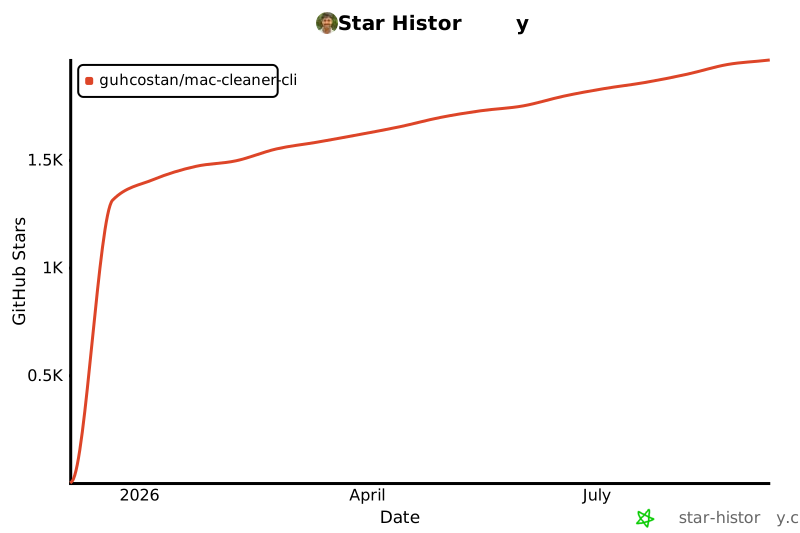
If this tool saved you disk space, a star goes a long way! It helps more Mac users discover this free alternative to paid cleaners.
[](https://star-history.com/#guhcostan/mac-cleaner-cli&Date)
## 💚 Support
If this tool saved you time or disk space, consider supporting the project!

Your support helps maintain and improve this tool. Thank you! 🙏
## 📄 License
MIT License — see [LICENSE](LICENSE) for details.
---
⚠️ Disclaimer
This tool deletes files from your system. While we've implemented safety measures, always ensure you have backups of important data.
Made with ❤️ for Mac users everywhere