# 自定义 IAM 地址
postbot config --iam-base-url https://custom-iam.example.com
```
## 🏗️ 开发
```bash
# 克隆仓库
git clone https://github.com/gitcoffee-os/postbot-cli.git
cd postbot-cli
# 安装依赖
pnpm install
# 开发运行
pnpm dev
# 构建
pnpm build
# 以 postbot 模式运行
pnpm postbot
# 以 postar 模式运行
pnpm postar
```
## 📦 架构
```
apps/postbot-cli/ CLI 应用(commander + inquirer + chalk)
packages/sdk/postbot-sdk/ 通用 SDK(HTTP 客户端、认证、领域 API、类型)
```
CLI 依赖的 API 调用能力全部由 `@gitcoffee/postbot-sdk` 提供,该 SDK 同样可被其他前端应用(如 PostBot.app、Postar.app)复用。
## 👀 使用体验
- [PostBot 内容同步助手 云端体验](https://postbot.exmay.com/exmay/postbot/center/home)
## 📚 技术文档
- [官网文档](https://postbot.exmay.com/docs)
- [用户指南](https://postbot.exmay.com/docs/README)
- [快速开始](https://postbot.exmay.com/docs/quickstart)
- [开发指南](https://postbot.exmay.com/docs/dev-guide)
## 💻 代码托管
### PostBot CLI
- GitHub:[https://github.com/gitcoffee-os/postbot-cli](https://github.com/gitcoffee-os/postbot-cli)
- Gitee:[https://gitee.com/gitcoffee-os/postbot-cli](https://gitee.com/gitcoffee-os/postbot-cli)
### PostBot
- GitHub:[https://github.com/gitcoffee-os/postbot](https://github.com/gitcoffee-os/postbot)
- Gitee:[https://gitee.com/gitcoffee-os/postbot](https://gitee.com/gitcoffee-os/postbot)
### 国版版 Postar
- GitHub:[https://github.com/gitcoffee-os/postar](https://github.com/gitcoffee-os/postar)
- Gitee:[https://gitee.com/gitcoffee-os/postar](https://gitee.com/gitcoffee-os/postar)
## 🙌 贡献指南
PostBot CLI 只有通过开源协作才能蓬勃发展。秉持这一精神,我们欢迎来自社区的各种贡献。如果您有意参与其中,请查阅我们的 [贡献者指南](https://postbot.exmay.com/docs/contributing) 。
## ⚖️ License
本项目遵循 [GitCoffee Open Source License](https://github.com/gitcoffee-os/postbot-cli/blob/main/LICENSE) 开源协议,该许可证本质上是 [Apache License 2.0](http://www.apache.org/licenses/LICENSE-2.0),但有一些额外的限制。
## 🤝 商务合作
- [合作咨询](https://postbot.exmay.com/docs/partner)
## 👥 加入社区
PostBot CLI 内容同步助手 微信 交流群:
 `
(扫码添加微信,备注:PostBot CLI,邀您加入群聊)
- [用户社群](https://postbot.exmay.com/docs/usergroup)
## 🌐 国际版
- [Postar - 国际版内容同步助手](https://postar.exmay.com/docs/) — 面向国际媒体平台(X / Twitter、Facebook、Instagram、TikTok、YouTube、LinkedIn 等)的内容同步分发工具。
- GitHub:[https://github.com/gitcoffee-os/postar](https://github.com/gitcoffee-os/postar)
## 🌍 开源生态
[开源生态](https://postbot.exmay.com/docs/opensource)
## 🌟 Star History
[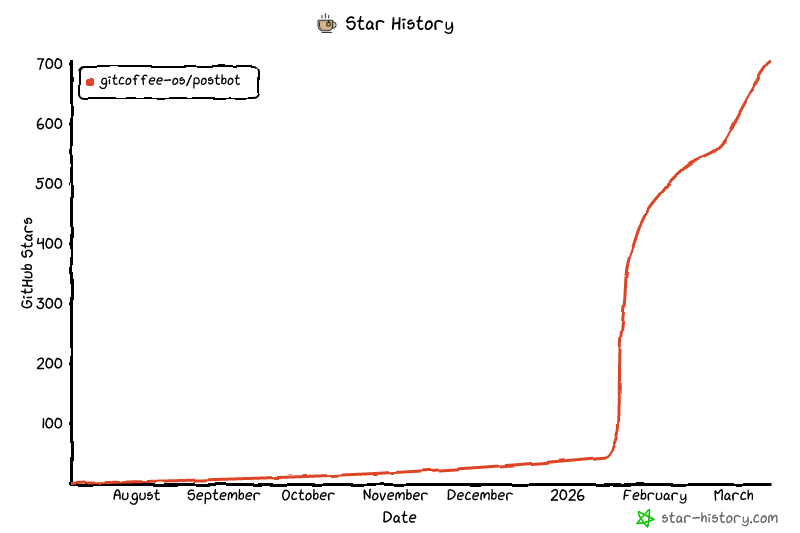](https://github.com/gitcoffee-os/postbot)
`
(扫码添加微信,备注:PostBot CLI,邀您加入群聊)
- [用户社群](https://postbot.exmay.com/docs/usergroup)
## 🌐 国际版
- [Postar - 国际版内容同步助手](https://postar.exmay.com/docs/) — 面向国际媒体平台(X / Twitter、Facebook、Instagram、TikTok、YouTube、LinkedIn 等)的内容同步分发工具。
- GitHub:[https://github.com/gitcoffee-os/postar](https://github.com/gitcoffee-os/postar)
## 🌍 开源生态
[开源生态](https://postbot.exmay.com/docs/opensource)
## 🌟 Star History
[](https://github.com/gitcoffee-os/postbot)
**⚡ PostBot 内容同步助手** - 一款开源的多平台内容同步分发生产力工具。
支持将文章、笔记、动态、图片、视频、音频等内容,一键同步发布至主流媒体平台。 🚀
[🏠 官网](https://postbot.exmay.com) | [📖 文档](https://postbot.exmay.com/docs) | [✨ PostBot 内容同步助手 云端体验](https://postbot.exmay.com/exmay/postbot/center/home) | [💬 社区](https://postbot.exmay.com/docs/usergroup) | [🐛 反馈](https://github.com/gitcoffee-os/postbot/issues) | [🌐 国际版 Postar](https://github.com/gitcoffee-os/postar)
**⚡ PostBot CLI** - 命令行下的多平台内容同步、任务流程管理效率工具。 🚀

