# TF-SimpleHumanPose
**Repository Path**: godycc/TF-SimpleHumanPose
## Basic Information
- **Project Name**: TF-SimpleHumanPose
- **Description**: TensorFlow implementation of "Simple Baselines for Human Pose Estimation and Tracking", ECCV 2018
- **Primary Language**: Unknown
- **License**: MulanPSL-2.0
- **Default Branch**: master
- **Homepage**: None
- **GVP Project**: No
## Statistics
- **Stars**: 0
- **Forks**: 2
- **Created**: 2020-08-18
- **Last Updated**: 2020-12-19
## Categories & Tags
**Categories**: Uncategorized
**Tags**: None
## README
# Simple Baselines for Human Pose Estimation and Tracking
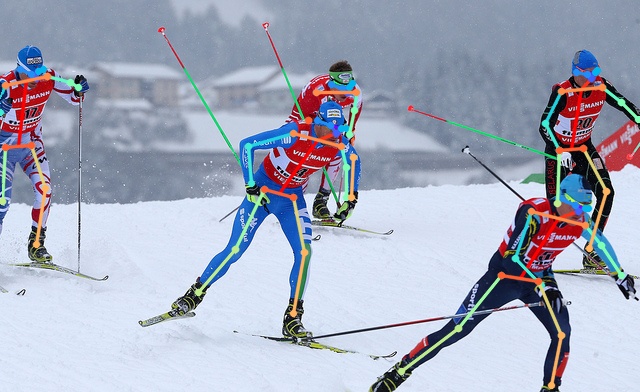

## Introduction
This repo is **[TensorFlow](https://www.tensorflow.org)** implementation of **[Simple Baselines for Human Pose Estimation and Tracking (ECCV 2018)](https://arxiv.org/abs/1804.06208)** of MSRA for **2D multi-person pose estimation** from a single RGB image.
**What this repo provides:**
* [TensorFlow](https://www.tensorflow.org) implementation of [Simple Baselines for Human Pose Estimation and Tracking](https://arxiv.org/abs/1804.06208).
* Flexible and simple code.
* Compatibility for most of the publicly available 2D multi-person pose estimation datasets including **[MPII](http://human-pose.mpi-inf.mpg.de/), [PoseTrack 2018](https://posetrack.net/), and [MS COCO 2017](http://cocodataset.org/#home)**.
* Human pose estimation visualization code (modified from [Detectron](https://github.com/facebookresearch/Detectron)).
## Dependencies
* [TensorFlow](https://www.tensorflow.org/)
* [CUDA](https://developer.nvidia.com/cuda-downloads)
* [cuDNN](https://developer.nvidia.com/cudnn)
* [Anaconda](https://www.anaconda.com/download/)
* [COCO API](https://github.com/cocodataset/cocoapi)
This code is tested under Ubuntu 16.04, CUDA 9.0, cuDNN 7.1 environment with two NVIDIA 1080Ti GPUs.
Python 3.6.5 version with Anaconda 3 is used for development.
## Directory
### Root
The `${POSE_ROOT}` is described as below.
```
${POSE_ROOT}
|-- data
|-- lib
|-- main
|-- tool
`-- output
```
* `data` contains data loading codes and soft links to images and annotations directories.
* `lib` contains kernel codes for 2d multi-person pose estimation system.
* `main` contains high-level codes for training or testing the network.
* `tool` contains dataset converter. I set MS COCO as reference format and provide mpii2coco and posetrack2coco converting code.
* `output` contains log, trained models, visualized outputs, and test result.
### Data
You need to follow directory structure of the `data` as below.
```
${POSE_ROOT}
|-- data
|-- |-- MPII
| `-- |-- dets
| | |-- human_detection.json
| |-- annotations
| | |-- train.json
| | `-- test.json
| `-- images
| |-- 000001163.jpg
| |-- 000003072.jpg
|-- |-- PoseTrack
| `-- |-- dets
| | |-- human_detection.json
| |-- annotations
| | |-- train2018.json
| | |-- val2018.json
| | `-- test2018.json
| |-- original_annotations
| | |-- train/
| | |-- val/
| | `-- test/
| `-- images
| |-- train/
| |-- val/
| `-- test/
|-- |-- COCO
| `-- |-- dets
| | |-- human_detection.json
| |-- annotations
| | |-- person_keypoints_train2017.json
| | |-- person_keypoints_val2017.json
| | `-- image_info_test-dev2017.json
| `-- images
| |-- train2017/
| |-- val2017/
| `-- test2017/
`-- |-- imagenet_weights
| |-- resnet_v1_50.ckpt
| |-- resnet_v1_101.ckpt
| `-- resnet_v1_152.ckpt
```
* In the `tool`, run `python mpii2coco.py` to convert MPII annotation files to MS COCO format (`MPII/annotations`).
* In the `tool`, run `python posetrack2coco.py` to convert PoseTrack annotation files to MS COCO format (`PoseTrack/annotations`).
* In the training stage, GT human bbox is used, and `human_detection.json` is used in testing stage which should be prepared before testing and follow [MS COCO format](http://cocodataset.org/#format-results).
* Download imagenet pre-trained resnet models from [tf-slim](https://github.com/tensorflow/models/tree/master/research/slim) and place it in the `data/imagenet_weights`.
* Except for `annotations` of the MPII and PoseTrack, all other directories are original version of downloaded ones.
* If you want to add your own dataset, you have to convert it to [MS COCO format](http://cocodataset.org/#format-data).
* You can change default directory structure of `data` by modifying `dataset.py` of each dataset folder.
### Output
You need to follow the directory structure of the `output` folder as below.
```
${POSE_ROOT}
|-- output
|-- |-- log
|-- |-- model_dump
|-- |-- result
`-- |-- vis
```
* Creating `output` folder as soft link form is recommended instead of folder form because it would take large storage capacity.
* `log` folder contains training log file.
* `model_dump` folder contains saved checkpoints for each epoch.
* `result` folder contains final estimation files generated in the testing stage.
* `vis` folder contains visualized results.
* You can change default directory structure of `output` by modifying `main/config.py`.
## Running TF-SimpleHumanPose
### Start
* Run `pip install -r requirement.txt` to install required modules.
* Run `cd ${POSE_ROOT}/lib` and `make` to build NMS modules.
* In the `main/config.py`, you can change settings of the model including dataset to use, network backbone, and input size and so on.
### Train
In the `main` folder, run
```bash
python train.py --gpu 0-1
```
to train the network on the GPU 0,1.
If you want to continue experiment, run
```bash
python train.py --gpu 0-1 --continue
```
`--gpu 0,1` can be used instead of `--gpu 0-1`.
### Test
Place trained model at the `output/model_dump/$DATASET/` and human detection result (`human_detection.json`) to `data/$DATASET/dets/`.
In the `main` folder, run
```bash
python test.py --gpu 0-1 --test_epoch 140
```
to test the network on the GPU 0,1 with 140th epoch trained model. `--gpu 0,1` can be used instead of `--gpu 0-1`.
## Results
Here I report the performance of the model from this repo and [the original paper](https://arxiv.org/abs/1804.06208). Also, I provide pre-trained models and human detection results.
As this repo outputs compatible output files for MS COCO and PoseTrack, you can directly use [cocoapi](https://github.com/cocodataset/cocoapi) or [poseval]( https://github.com/leonid-pishchulin/poseval) to evaluate result on the MS COCO or PoseTrack dataset. You have to convert the produced `mat` file to MPII `mat` format to evaluate on MPII dataset following [this](http://human-pose.mpi-inf.mpg.de/#evaluation).
### Results on MSCOCO 2017 dataset
For all methods, the same human detection results are used (download link is provided at below). For comparison, I used pre-trained model from [original repo](https://github.com/Microsoft/human-pose-estimation.pytorch) to report the performance of the original repo. The table below is APs on COCO val2017 set.
| Methods | AP | AP .5 | AP .75 | AP (M) | AP (L) | AR | AR .5 | AR .75 | AR (M) | AR (L) | Download |
|:---:|:---:|:---:|:---:|:---:|:---:|:---:|:---:|:---:|:---:|:---:|:---:|
| 256x192_resnet50
(this repo) | 70.4 | 88.6 | 77.8 | 67.0 | 76.9 | 76.2 | 93.0 | 83.0 | 71.9 | 82.4 | [model](https://cv.snu.ac.kr/research/TF-SimpleHumanPose/COCO/model/256x192_resnet50_coco.zip)
[pose](https://cv.snu.ac.kr/research/TF-SimpleHumanPose/COCO/pose_result/person_keypoints_256x192_resnet50_val2017_results.json) |
| 256x192_resnet50
([original repo](https://github.com/Microsoft/human-pose-estimation.pytorch)) | 70.3 | 88.8 | 77.8 | 67.0 | 76.7 | 76.1 | 93.0 | 82.9 | 71.8 | 82.3 | - |
* Human detection result on val2017 (55.3 AP on human class) [[bbox](https://cv.snu.ac.kr/research/TF-SimpleHumanPose/COCO/det_result/human_detection_val2017.json)]
* Human detection result on test-dev2017 (57.2 AP on human class) [[bbox](https://cv.snu.ac.kr/research/TF-SimpleHumanPose/COCO/det_result/human_detection_test-dev2017.json)]
* Other human detection results on val2017 [[Detectron_MODEL_ZOO](https://github.com/facebookresearch/Detectron/blob/master/MODEL_ZOO.md)]
### Results on PoseTrack 2018 dataset
The pre-trained model on COCO dataset is used for training on the PoseTrack dataset following [paper](https://arxiv.org/abs/1804.06208). After training model on the COCO dataset, I set `lr`, `lr_dec_epoch`, `end_epoch` in `config.py` to `5e-5`, `[150, 155]`, `160`, respectively. Then, run `python train.py --gpu $GPUS --continue`. The table below is APs on validation set.
| Methods | Head | Shoulder | Elbow | Wrist | Hip | Knee | Ankle | Total | Download |
|:---:|:---:|:---:|:---:|:---:|:---:|:---:|:---:|:---:|:---:|
| 256x192_resnet50
(bbox from detector) | 74.4 | 76.9 | 72.2 | 65.2 | 69.2 | 70.0 | 62.9 | 70.4 | [model](https://cv.snu.ac.kr/research/TF-SimpleHumanPose/PoseTrack/model/256x192_resnet50_posetrack.zip)
[pose](https://cv.snu.ac.kr/research/TF-SimpleHumanPose/PoseTrack/pose_result/person_keypoints_256x192_resnet50_val_results.zip) |
| 256x192_resnet50
(bbox from GT) | 87.9 | 86.7 | 80.2 | 72.5 | 77.0 | 77.8 | 74.6 | 80.1 | [model](https://cv.snu.ac.kr/research/TF-SimpleHumanPose/PoseTrack/model/256x192_resnet50_posetrack.zip)
[pose](https://cv.snu.ac.kr/research/TF-SimpleHumanPose/PoseTrack/pose_result/person_keypoints_256x192_resnet50_gtbbox_val_results.zip) |
* Human detection result on validation set [[bbox](https://cv.snu.ac.kr/research/TF-SimpleHumanPose/PoseTrack/det_result/human_detection_val.json)]
## Troubleshooting
1. Add graph.finalize when your machine takes more memory as training goes on. [[issue](https://github.com/mks0601/TF-SimpleHumanPose/issues/9)]
2. For those who suffer from `FileNotFoundError: [Errno 2] No such file or directory: 'tmp_result_0.pkl'` in testing stage, **please prepare human detection result properly**. The pkl files are generated and deleted automatically in testing stage, so you don't have to prepare them. Most of this error comes from inproper human detection file.
## Acknowledgements
This repo is largely modified from [TensorFlow repo of CPN](https://github.com/chenyilun95/tf-cpn) and [PyTorch repo of Simple](https://github.com/Microsoft/human-pose-estimation.pytorch).
## Reference
[1] Xiao, Bin, Haiping Wu, and Yichen Wei. "Simple Baselines for Human Pose Estimation and Tracking". ECCV 2018.