# atlascode
**Repository Path**: mirrors_atlassian/atlascode
## Basic Information
- **Project Name**: atlascode
- **Description**: Atlassian for VS Code (Official) - Providing Jira and Bitbucket integrations for VS Code
- **Primary Language**: Unknown
- **License**: Apache-2.0
- **Default Branch**: main
- **Homepage**: None
- **GVP Project**: No
## Statistics
- **Stars**: 0
- **Forks**: 0
- **Created**: 2024-12-07
- **Last Updated**: 2026-08-01
## Categories & Tags
**Categories**: Uncategorized
**Tags**: None
## README
# Your Atlassian workspace, right in VS Code
Stop switching tabs. Start shipping code. The Atlassian extension brings **Jira**, **Bitbucket**, and AI-powered **Rovo Dev** directly into your IDE.
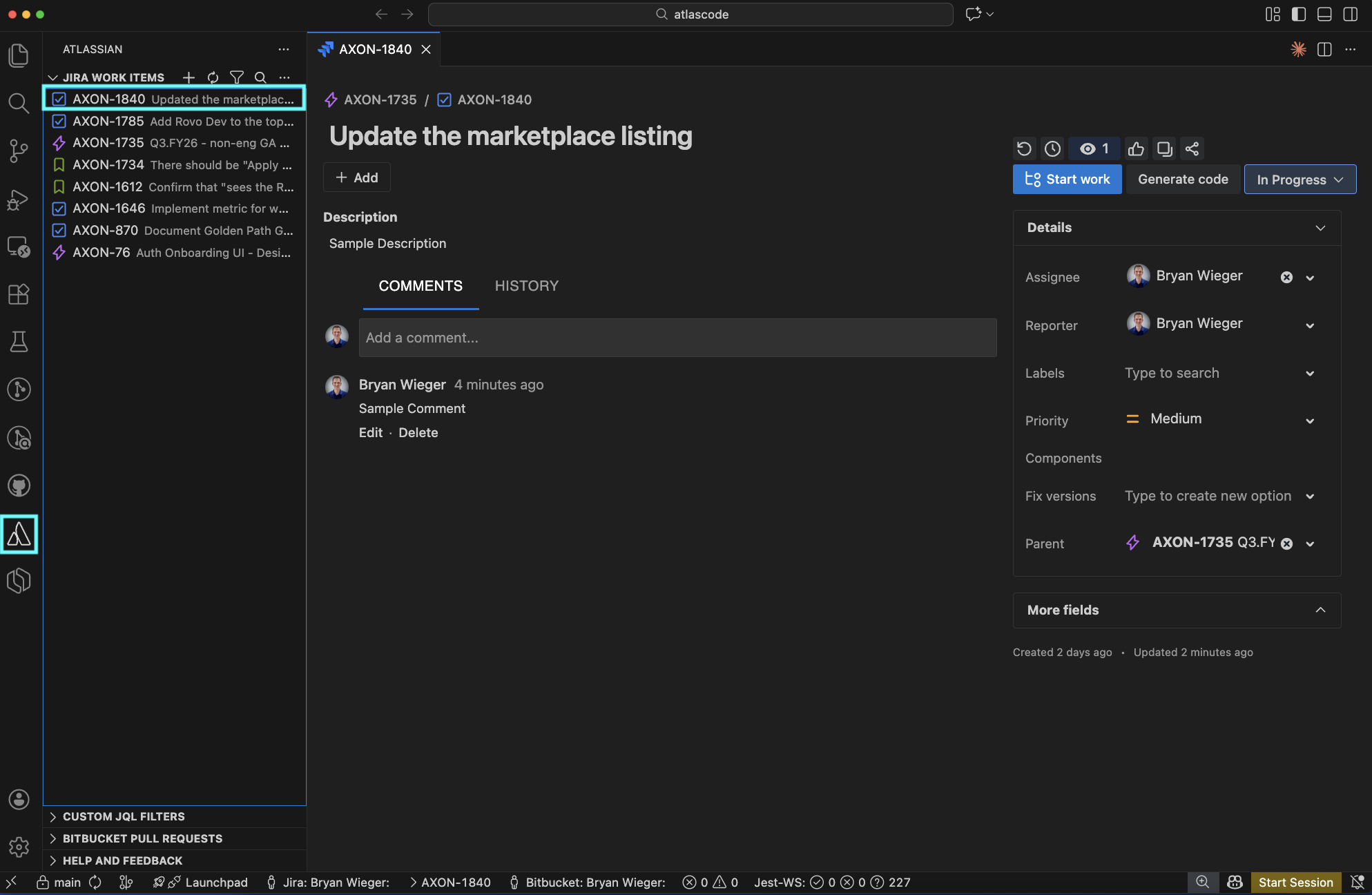
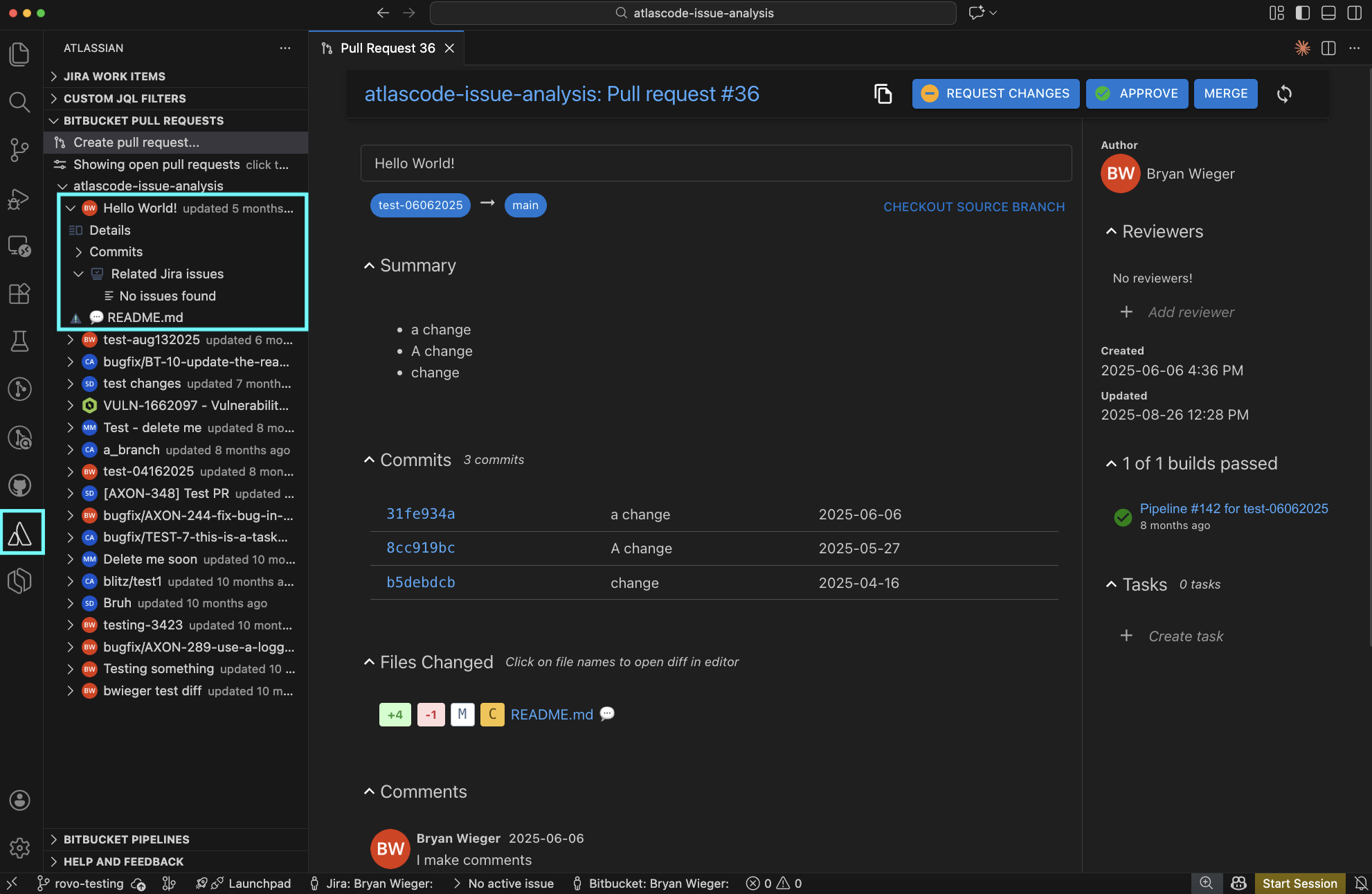
Browse, View, Create, and Manage your Jira Work Items, Bitbucket PRs, Bitbucket Pipelines.
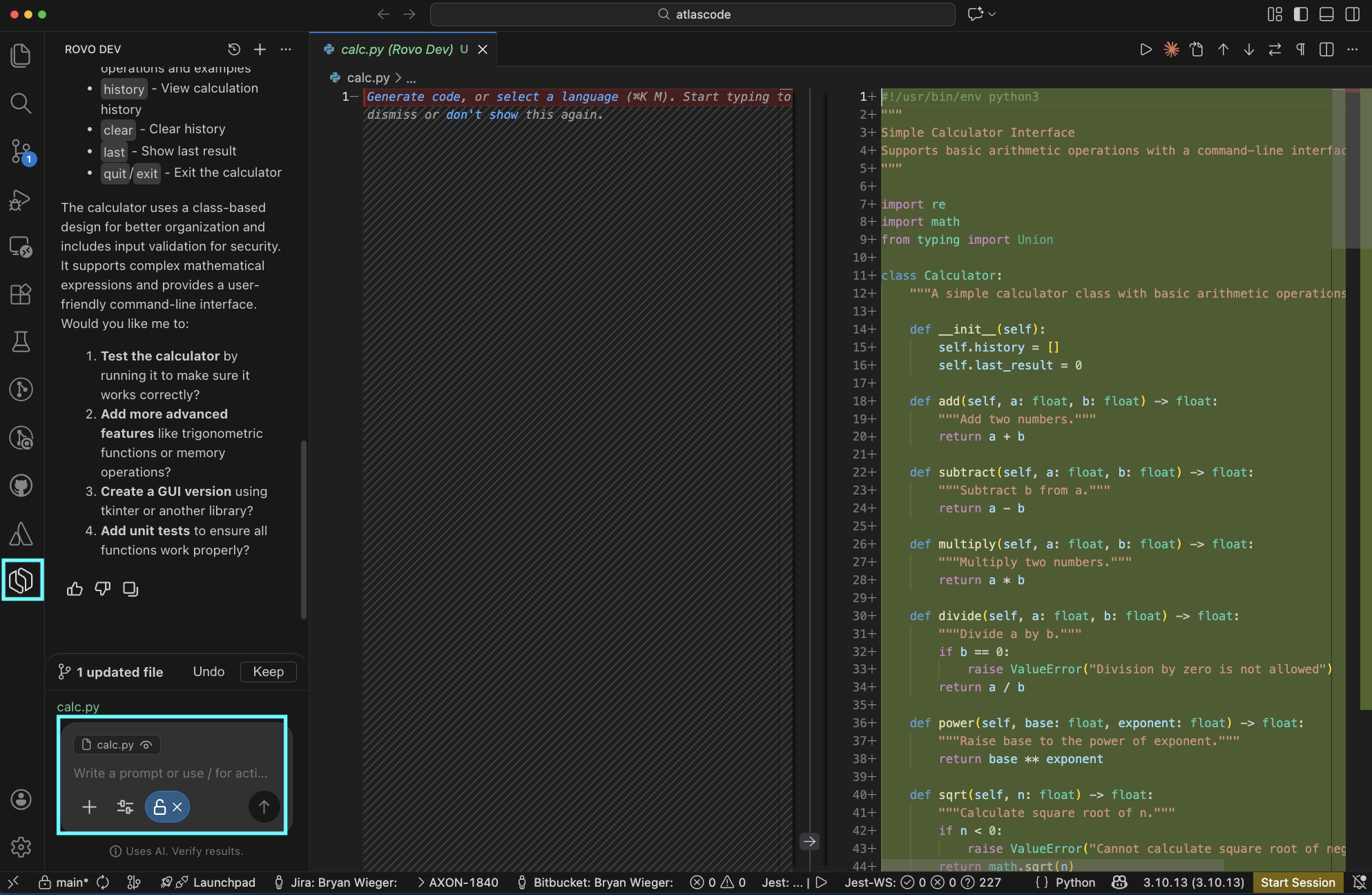
**Now with Rovo Dev**: Your context-aware AI teammate that knows your codebase, tickets, and docs. Rovo Dev brings AI-assisted development directly into VS Code by combining Atlassian context with code-aware assistance.
- Ask questions about code, Jira work items, or Confluence docs without leaving your IDE
- Offload tasks like drafting Jira work items, pull requests, and even code changes to Rovo Dev
- Get work suggestions, view your code reviews, and tackle tasks directly from VS Code
- Manage notifications and reviews in-flow—no context switching
**New in GA:** Mode control for AI autonomy, auto-saving sessions, file-aware context, full change history with native diff views and more.
Compatible with VS Code, Cursor, Windsurf and other forks.
## Jira
 ## Rovo Dev
 ## Bitbucket
 # Get Started
1. Install the extension (one click)
2. Authenticate the extension with Atlassian
3. Open a Jira, View a PR, or ask Rovo Dev to work on something
4. At this time, Jira, Bitbucket, and Rovo Dev use separate auths. Please sign in to each that you wish to use.
# Usage
| Product | Command Palette | Available Features |
|---------|-----------------|---------|
| **Authentication: Jira & Bitbucket** | Atlassian: Open Settings | Sign in / Login |
| **Authentication: Rovo Dev** | Rovo Dev: Open | Sign In / Login |
| **Jira** | Jira: | Browse, Search, View, Update, Create, and Start |
| **Rovo Dev - AI Coding Agent** | Rovo: | Ask questions, start on Jiras, write tests or documentation |
| **Pull Requests** | Bitbucket: | Browse, View, Update, Create, and Approve / Decline / Merge |
| **Pipelines** | Bitbucket: | Browse, View, Run |
# Troubleshooting
If the table below doesn't help you, [raise an issue here.](https://github.com/atlassian/atlascode/issues?q=is%3Aissue%20state%3Aopen%20sort%3Aupdated-desc)
| Issue | Troubleshooting Steps |
|-------|----------------------|
| **Rovo Dev not working** | 1. Confirm you are on the latest stable release
# Get Started
1. Install the extension (one click)
2. Authenticate the extension with Atlassian
3. Open a Jira, View a PR, or ask Rovo Dev to work on something
4. At this time, Jira, Bitbucket, and Rovo Dev use separate auths. Please sign in to each that you wish to use.
# Usage
| Product | Command Palette | Available Features |
|---------|-----------------|---------|
| **Authentication: Jira & Bitbucket** | Atlassian: Open Settings | Sign in / Login |
| **Authentication: Rovo Dev** | Rovo Dev: Open | Sign In / Login |
| **Jira** | Jira: | Browse, Search, View, Update, Create, and Start |
| **Rovo Dev - AI Coding Agent** | Rovo: | Ask questions, start on Jiras, write tests or documentation |
| **Pull Requests** | Bitbucket: | Browse, View, Update, Create, and Approve / Decline / Merge |
| **Pipelines** | Bitbucket: | Browse, View, Run |
# Troubleshooting
If the table below doesn't help you, [raise an issue here.](https://github.com/atlassian/atlascode/issues?q=is%3Aissue%20state%3Aopen%20sort%3Aupdated-desc)
| Issue | Troubleshooting Steps |
|-------|----------------------|
| **Rovo Dev not working** | 1. Confirm you are on the latest stable release
2. Confirm you have a Scoped API token
3. Confirm the site on the API token has Rovo Dev enabled
4. Confirm you haven't run out of tokens
5. Try creating a new session
6. Try restarting your IDE
7. Try re-authenticating |
| **Jira Work Items not displaying** | 1. Confirm you are on the latest stable release
2. Try restarting the IDE
3. Try re-authenticating |
| **Bitbucket PRs not displaying** | 1. Confirm you are in a repo that uses Bitbucket as a remote
2. Confirm you are on the latest stable release
3. Try restarting the IDE
4. Try re-authenticating |
| **Bitbucket Pipelines not displaying** | 1. Confirm you are in a repo that uses Bitbucket as a remote
2. Confirm you are on the latest stable release
3. Try restarting the IDE
4. Try re-authenticating |
| **Authentication: Bitbucket/Jira Server failing to Authneticate** | 1. Confirm your server version is supported by the [Atlassian End of Support Policy](https://confluence.atlassian.com/support/atlassian-support-end-of-life-policy-201851003.html)
2. Confirm you are on the latest stable release
3. Try restarting the IDE
4. Try re-authenticating |
# Compatibility
| Platform | Version | Compatibility |
|----------|---------|---------|
| Jira Cloud | - | ✅ |
| Bitbucket Cloud | - | ✅ |
| Rovo Dev | via Jira Cloud API Tokens | ✅ |
| RDE / WSL | via API Tokens | ✅Jira
❌ Bitbucket |
| Jira & Bitbucket DC / Server | [Atlassian End of Support Policy](https://confluence.atlassian.com/support/atlassian-support-end-of-life-policy-201851003.html) | ✅
| VS Code | >= 1.77.0 | ✅
| Cursor | - | ✅
| Windsurf | - | ✅
| VS Codium | - | ✅
If you are Jira or Bitbucket DC / Server, you can find your instance's version in the footer of any Jira/Bitbucket page.
# Additional support docs
https://confluence.atlassian.com/display/BITBUCKET/Getting+started+with+VS+Code
https://support.atlassian.com/bitbucket-cloud/docs/use-the-atlassian-for-vs-code-extension/
# For Contibutors
[](LICENSE) [](CONTRIBUTING.md)
## Installation
Running and debugging the extension:
- Atlassian for VS Code is a node project, as such you'll need to run `npm install` before building.
- To debug the extension from within VS Code you'll need a `launch.json`.
** An example `launch.json` that will be suitable for most users is included as `.vscode/launch.json.example`.
** To use the example file simply copy it to `launch.json`.
- Once you have a `launch.json` file select "Debug and Run" from the Activity Bar and click "Start Debugging".
\*\* After the extension builds VS Code will launch a new instance of itself (the Extension Development Host) running the extension.
- When you want to test your code changes
** If the extension development host is still running restart by clicking ⟲ in the debug toolbar.
** If you've already stopped the host just start debugging again.
## Documentation
### Feature Flags
This package uses FX3 - Atlassian's internal solution for running experiments and rolling out features. Using it requires an API key, which is not included in code as a matter of policy.
If you are an Atlassian dev reading this - please look up the `atlascode` section [here](https://developer.atlassian.com/platform/frontend-feature-flags/resources/api-keys/), copy the value for the appropriate environment into `.env`, and rebuild the project.
If you are an external contributor - please feel free to ignore the feature gate client initialization failure, the default configuration of the extension will work without it, as if all feature gated content were disabled.
### Remote Debugging
For some tasks, it's important to be able to emulate [remote execution](https://code.visualstudio.com/docs/remote/remote-overview) of the VS Code - e.g. to reproduce or debug the behavior users observe when working in browser-based tools like Github Codespaces, or Salesforce Code Builder.
VSCode provides some very helpful [documentation](https://code.visualstudio.com/api/advanced-topics/remote-extensions#debugging-extensions) on how to test and debug extensions for that environment. In short, one would need to set up Dev Containers execution as described [here](https://code.visualstudio.com/api/advanced-topics/remote-extensions#debugging-in-a-custom-development-container).
To run `atlascode` in such a way, please follow the VSCode documentation:
- Install [Dev Containers](https://marketplace.visualstudio.com/items?itemName=ms-vscode-remote.remote-containers) VSCode Extension
- Run `npm install` like you normally would
- In VSCode, choose `Dev Containers: Rebuild and Reopen in Container` from the command pallette
- Wait for the VSCode to re-open in the container evnironment - you'll be able to see the difference in the header/search bar
- Proceed to run or debug the extension as usual - it will now be running as it would in remote execution
The configuration for the Dev Container is located in [./.devcontainer/devcontainer.json](https://github.com/atlassian/atlascode/blob/main/.devcontainer/devcontainer.json).
Note: for advanced use-cases, it is possible to run scripts in dev containers via [@devcontainers/cli](https://github.com/devcontainers/cli) - try `npx devcontainer --help`
## Tests
```
npm run test
```
## Contributions
Contributions to Atlassian for VS Code are welcome! Please see [CONTRIBUTING.md](CONTRIBUTING.md) for details.
# Issues
To open a new issues, please see [Github](https://github.com/atlassian/atlascode/issues)
## License
See [LICENSE](LICENSE) file
[](https://www.atlassian.com)