# smart-doc
**Repository Path**: mrava/smart-doc
## Basic Information
- **Project Name**: smart-doc
- **Description**: smart-doc是一个java restful api文档生成工具,smart-doc颠覆了传统类似swagger这种大量采用注解侵入来生成文档的实现方法
- **Primary Language**: Java
- **License**: Apache-2.0
- **Default Branch**: master
- **Homepage**: https://gitee.com/sunyurepository/smart-doc/wikis/Home
- **GVP Project**: No
## Statistics
- **Stars**: 0
- **Forks**: 641
- **Created**: 2020-04-19
- **Last Updated**: 2020-12-19
## Categories & Tags
**Categories**: Uncategorized
**Tags**: None
## README
Smart-Doc Project
[中文文档](https://github.com/shalousun/smart-doc/blob/master/README_CN.md)
## Introduce
Smart-doc is a java restful api document generation tool. Smart-doc is based on interface source code analysis to generate interface documents, and zero annotation intrusion.
You only need to write java standard comments when developing, smart-doc can help you generate a simple and clear markdown
Or a static html document. If you are tired of the numerous annotations and strong intrusion code contamination of document tools like swagger, then hug smart-doc!
## Features
- Zero annotation, zero learning cost, only need to write standard java document comments.
- Automatic derivation based on source code interface definition, powerful return structure derivation support.
- Support Spring MVC, Spring Boot, Spring Boot Web Flux (Controller mode writing).
- Supports the derivation of asynchronous interface returns such as Callable, Future, CompletableFuture.
- Support JAVA's JSR303 parameter verification specification.
- Support for automatic generation of request examples based on request parameters.
- Support for generating json return value examples.
- Support for loading source code from outside the project to generate field comments (including the sources jar package).
- Support for generating multiple formats of documents: Markdown, HTML5, Asciidoctor,Postman Collection json.
- Support for exporting error codes and data dictionary codes to API documentation.
## Getting started
[Smart-doc Samples](https://github.com/shalousun/smart-doc-demo.git)。
```
# git clone https://github.com/shalousun/smart-doc-demo.git
```
This example already provides a static html document generated in advance. You can start the Spring Boot project and then go directly to `http://localhost:8080/doc/api.html` to view the interface documentation generated by smart-doc.
Of course you can also browse `http://localhost:8080/doc/api.html`,
which looks a html like generated by `asciidoctor-maven-plugin` plugin.
### Add Maven plugin
Add smart-doc-maven-plugin in your pom.xml.
```
com.github.shalousun
smart-doc-maven-plugin
[latest]
./src/main/resources/smart-doc.json
com.google.guava:guava
compile
html
```
### Create a json config
Create a json configuration file in your project. The smart-doc-maven-plugin plugin will use this configuration information.
For example, create `/src/main/resources/smart-doc.json` in the project.
The configuration contents are as follows.
**Minimize configuration:**
```
{
"allInOne": true, // whether to merge documents into one file, generally recommended as true
"isStrict": false,//If the strict mode is set to true, Smart-doc forces that the public method in each interface in the code has a comment.
"outPath": "/src/main/resources" //Set the api document output path.
}
```
Only three configuration items are required to use the smart-doc-maven-plugin to generate API documentation. In fact, only outPath must be configured.
**Detailed configuration content:**
When you need to use smart-doc to generate more API document information, you can add detailed configuration content.
```
{
"serverUrl": "http://127.0.0.1", // Set the server address, not required
"isStrict": false, // whether to enable strict mode
"allInOne": true, // whether to merge documents into one file, generally recommended as true
"outPath": "D: // md2", // Specify the output path of the document
"coverOld": true, // Whether to overwrite old files, mainly used for mardown file overwrite
"packageFilters": "", // controller package filtering, multiple package names separated by commas
"md5EncryptedHtmlName": false, // only used if each controller generates an html file
"projectName": "smart-doc", // Configure your own project name
"skipTransientField": true, // Not currently implemented
"dataDictionaries": [// Configure the data dictionary, no need to set
{
"title": "Order Status", // The name of the data dictionary
"enumClassName": "com.power.doc.enums.OrderEnum", // Data dictionary enumeration class name
"codeField": "code", // The field name corresponding to the data dictionary dictionary code
"descField": "desc" // Data dictionary object description information dictionary
}
],
"errorCodeDictionaries": [{// error code list, no need to set
"title": "title",
"enumClassName": "com.power.doc.enums.ErrorCodeEnum", // Error code enumeration class
"codeField": "code", // Code field name of the error code
"descField": "desc" // Field name corresponding to the error code description
}],
"revisionLogs": [// Set document change records, no need to set
{
"version": "1.0", // Document version number
"status": "update", // Change operation status, generally: create, update, etc.
"author": "author", // Document change author
"remarks": "desc" // Change description
}
],
"customResponseFields": [// Customly add fields and comments. If api-doc encounters a field with the same name later, directly add a comment to the corresponding field. It is not necessary.
{
"name": "code", // Override the response code field
"desc": "Response code", // Override field comment of response code
"value": "00000" // Set the value of the response code
}
],
"apiObjectReplacements": [{ // Supports replacing specified objects with custom objects to complete document rendering
"className": "org.springframework.data.domain.Pageable",
"replacementClassName": "com.power.doc.model.PageRequestDto" //Use custom PageRequestDto instead of JPA Pageable for document rendering.
}],
"requestHeaders": [// Set global request headers, no need to set
{
"name": "token",
"type": "string",
"desc": "desc",
"required": false,
"since": "-"
}
]
}
```
**Note:** The above json configuration is completely converted into json using the smart-doc's ApiConfig.
So the project configuration can also refer to the introduction of smart-doc.
### Generated document
#### Run plugin with maven command
```
// Generate html
mvn -Dfile.encoding = UTF-8 smart-doc: html
// Generate markdown
mvn -Dfile.encoding = UTF-8 smart-doc: markdown
// Generate adoc
mvn -Dfile.encoding = UTF-8 smart-doc: adoc
// Generate postman collection
mvn -Dfile.encoding = UTF-8 smart-doc: postman
```
**Note:** Under the window system, if you use the maven command line to perform document generation,
non-English characters may be garbled, so you need to specify `-Dfile.encoding = UTF-8` during execution.
View maven's coding
```
# mvn -version
Apache Maven 3.3.3 (7994120775791599e205a5524ec3e0dfe41d4a06; 2015-04-22T19:57:37+08:00)
Maven home: D:\ProgramFiles\maven\bin\..
Java version: 1.8.0_191, vendor: Oracle Corporation
Java home: D:\ProgramFiles\Java\jdk1.8.0_191\jre
Default locale: zh_CN, platform encoding: GBK
OS name: "windows 10", version: "10.0", arch: "amd64", family: "dos"
```
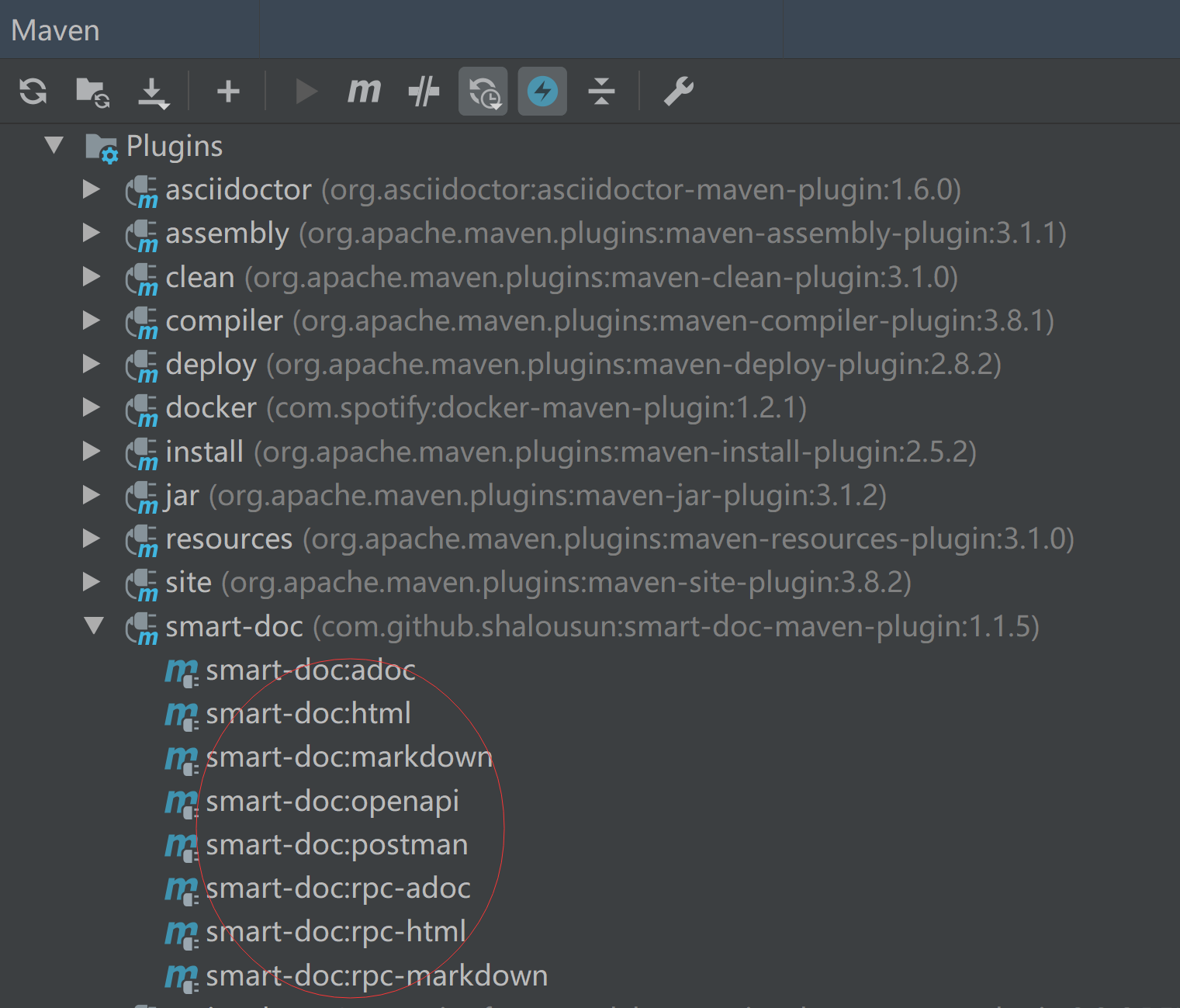
#### Run plugin in IDEA
On Use IntelliJ IDE, if you have added smart-doc-maven-plugin to the project,
you can directly find the plugin smart-doc plugin and click to generate API documentation.
## Generated document example
#### Interface header rendering

#### Request parameter example rendering

#### Response parameter example renderings

## Integration through unit tests
You can generate documentation by adding smart-doc dependencies directly to your project and then writing unit tests to start smart-doc.
But we still recommend that you use the smart-doc-maven-plugin plugin.
[Use smart-doc by junit test](https://github.com/smart-doc-group/smart-doc/wiki/Use-smart-doc-by-junit-test)
## Building
you can build with the following commands. (Java 1.8 is required to build the master branch)
```
mvn clean install -Dmaven.test.skip=true
```
## Contributors
Thanks to the following people who have submitted major pull requests:
- [@zuonidelaowang](https://github.com/zuonidelaowang)
- [@su-qiu](https://github.com/su-qiu)
- [@qinkangdeid](https://github.com/qinkangdeid)
- [@br7roy](https://github.com/br7roy)
- [@caiqyxyx](https://gitee.com/cy-work)
## Other reference
- [Smart-doc manual](https://github.com/shalousun/smart-doc/wiki)
## Who is using
These are only part of the companies using smart-doc, for reference only. If you are using smart-doc, please [add your company here](https://github.com/shalousun/smart-doc/issues/12) to tell us your scenario to make smart-doc better.


 ## License
Smart-doc is under the Apache 2.0 license. See the [LICENSE](https://github.com/shalousun/smart-doc/blob/master/LICENSE) file for details.
## Contact
Email: 836575280@qq.com