# AIMedia
**Repository Path**: springbootdemo/AIMedia
## Basic Information
- **Project Name**: AIMedia
- **Description**: No description available
- **Primary Language**: Unknown
- **License**: Apache-2.0
- **Default Branch**: main
- **Homepage**: None
- **GVP Project**: No
## Statistics
- **Stars**: 0
- **Forks**: 10
- **Created**: 2026-01-14
- **Last Updated**: 2026-01-14
## Categories & Tags
**Categories**: Uncategorized
**Tags**: None
## README
AIMedia 🤖




自动抓取热点,自动生成新闻,自动发布各大平台。
全自动托管AI媒体软件
全新架构:
Django 后端 +
PySide6 桌面端,提供企业级稳定性和优秀的用户体验
> **⚠️ 重要说明**
>
> 本项目为**工程级重量项目**,包含完整的 Django 后端服务、PySide6 桌面客户端,并集成了微信支付、登录等企业级功能。
>
> **使用本项目需要:**
> - 自行部署 Django 后端服务
> - 打包 PySide6 桌面应用
> - 配置数据库、支付接口等复杂环境
>
> **🎉 新版本开发中:[AiMaster](https://github.com/Anning01/AiMaster)**
>
> 我们正在开发更轻量、更稳定的新版本,采用:
> - **FastAPI** 后端(替代 Django,更轻量)
> - **浏览器插件** 客户端(无需打包,开箱即用)
> - **公众号 API** 直接调用(更稳定可靠)
>
> 新版本更适合快速部署和使用,敬请期待!
>
> **官网说明**:官网功能仍在开发中,[官网链接](https://aimedia.daniu7.cn)
>
> 只对爬虫感兴趣的开发者可以直接看 [article-spider](https://github.com/Anning01/article-spider)
## 项目架构 🏗️
本项目采用前后端分离的架构设计,由两个主要部分组成:
### 后端服务 - Django (back/)
- 提供 RESTful API 接口
- 数据库管理与持久化
- 任务调度与自动化执行
- 热点新闻抓取服务
- AI 内容生成引擎
- 多平台发布管理
### 前端应用 - PySide6 (pyside/)
- 直观的图形用户界面
- 本地任务管理
- 实时数据监控
- 配置管理面板
- 跨平台桌面应用
### 技术栈
- **后端**: Django 5.x + Django REST Framework
- **前端**: PySide6 (Qt for Python)
- **数据库**: SQLite / PostgreSQL / MySQL
- **AI**: 智谱 AI + Stable Diffusion
- **自动化**: Selenium + Chrome
## 功能特性 🎯
### 热点新闻抓取
- [x] 抖音热点
- [x] 网易新闻
- [x] 微博热点
- [x] 澎湃新闻
- [x] 中国日报
- [x] 搜狐新闻
### AI 智能创作
- [x] 基于热点新闻的 AI 自动创作
- [x] AI 图像生成(增加原创率)
- [x] 多平台内容适配
### 多平台发布
- [x] 今日头条
- [x] 企鹅号
- [x] 微信公众号
- [x] 百家号
### 系统管理
- [x] Django 后台管理系统
- [x] PySide6 桌面客户端
- [x] 任务调度与监控
- [x] 配置管理
- [x] 微信支付集成
- [x] 微信登录集成
## ⚠️ 部署说明
**本项目为工程级重量项目**,不适合开箱即用。使用前请充分了解以下要求:
### 技术门槛
- 需要具备 Django 项目部署经验
- 需要了解 PySide6 应用打包流程
- 需要配置微信支付、登录等第三方接口
- 需要自行搭建和维护数据库服务
### 部署工作量
- **后端部署**:Django 服务器配置、数据库迁移、环境变量配置等
- **前端打包**:PySide6 应用编译、依赖打包、图标资源等
- **接口配置**:微信支付商户号、应用密钥、回调地址等
- **运维维护**:日志监控、错误处理、版本更新等
**如果您需要更轻量、易用的解决方案,请关注新版本 [AiMaster](https://github.com/Anning01/AiMaster)!**
### 后期计划 📅
> **注意**:本项目(AIMedia)作为工程级版本,后续维护将以稳定性为主。
>
> 新功能开发已迁移至更轻量的新版本 **[AiMaster](https://github.com/Anning01/AiMaster)**,采用 FastAPI + 浏览器插件架构,更易部署和使用。
- [ ] ~~自动生成视频并发布各个平台~~(将在 AiMaster 中实现)
- [ ] ~~移动端应用开发~~(将在 AiMaster 中实现)
- [ ] ~~更多平台接入~~(将在 AiMaster 中实现)
- [x] Bug 修复和稳定性维护
## 配置要求 📦
### 硬件要求
- CPU: 4核或以上
- 内存: 8GB 或以上
- 硬盘: 10GB 可用空间
- 显卡: 非必须(AI 配图功能建议有独显)
### 软件要求
- Windows 10 或以上
- Python 3.12.4
- Chrome 浏览器(自动化发布需要)
## 快速开始 🚀
#### 前提条件
- 尽量不要使用 **中文路径**,避免出现一些无法预料的问题
- 请确保你的 **网络** 是正常的,VPN 需要打开全局流量模式
#### 1. 克隆代码
```shell
git clone https://github.com/Anning01/AIMedia.git
cd AIMedia
```
#### 2. 创建虚拟环境
**使用 Conda(推荐)**
```shell
conda create -n AIMedia python=3.12.4
conda activate AIMedia
pip install -r requirements.txt
```
**使用 venv**
```shell
python -m venv venv
# Windows
.\venv\Scripts\activate
# Linux/Mac
source venv/bin/activate
pip install -r requirements.txt
```
#### 3. 下载 Chrome 浏览器(自动发布功能需要)
下载地址:
- 百度网盘: https://pan.baidu.com/s/1x6J3K4KdWrI9vOG8yvSSBw 提取码:7jyw
下载后解压,整个目录放到 `.\AIMedia\pyside` 里面,最终的文件路径应该是这样: `.\AIMedia\pyside\chrome`
#### 4. 启动项目
请分别查看后端和前端的说明文档:
- **Django 后端**:查看 [back/README.md](back/README.md)
- **PySide6 前端**:查看 [pyside/README.md](pyside/README.md)
## 项目结构 📁
```
AIMedia/
├── back/ # Django 后端
│ ├── manage.py # Django 管理脚本
│ ├── config/ # 项目配置
│ ├── apps/ # 应用模块
│ └── ...
├── pyside/ # PySide6 前端
│ ├── main.py # 主入口
│ ├── ui/ # UI 界面
│ ├── utils/ # 工具函数
│ └── ...
├── docs/ # 文档资源
├── config.py # 配置文件模板
├── requirements.txt # Python 依赖
├── LICENSE # 许可证
└── README.md # 项目说明
```
## 视频演示 📺
B站视频链接:https://www.bilibili.com/video/BV1HABgYKE6H
## 交流讨论 💬
 ## 反馈建议 📢
- 可以提交 [issue](https://github.com/Anning01/AIMedia/issues)
或者 [pull request](https://github.com/Anning01/AIMedia/pulls)
## 许可证 📝
点击查看 [LICENSE](LICENSE) 文件
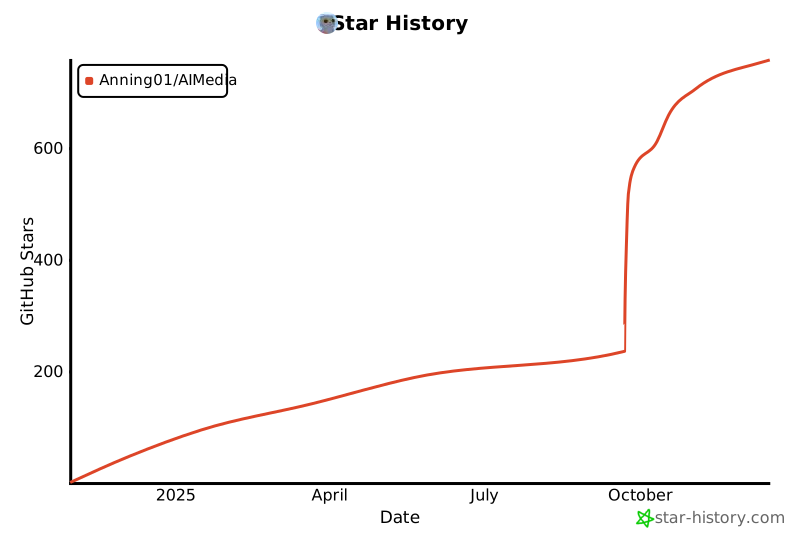
## Star History
[](https://star-history.com/#Anning01/AIMedia&Date)
## 反馈建议 📢
- 可以提交 [issue](https://github.com/Anning01/AIMedia/issues)
或者 [pull request](https://github.com/Anning01/AIMedia/pulls)
## 许可证 📝
点击查看 [LICENSE](LICENSE) 文件
## Star History
[](https://star-history.com/#Anning01/AIMedia&Date)