
# SmartSub
**Generate, translate, dub, and burn subtitles with built-in AI Assistant & MCP/CLI automation — an all-in-one open-source desktop app**
Make every frame speak beautifully


[](https://github.com/buxuku/SmartSub/releases/latest)
[](https://github.com/buxuku/SmartSub/releases)
[](https://github.com/buxuku/SmartSub/releases)
[](https://github.com/buxuku/SmartSub/blob/master/LICENSE)
[中文](README.md) | [English](README_EN.md) | [日本語](README_JA.md)
[Download](#download-and-install) · [Features](#features) · [AI Assistant & Automation](#-ai-creative-assistant-in-app-copilot) · [Free Workflow](#a-completely-free-workflow) · [FAQ](#faq) · [Changelog](https://github.com/buxuku/SmartSub/releases)

## What is SmartSub?
SmartSub is an open-source subtitle and dubbing tool that packs the whole pipeline — **speech-to-text → subtitle translation → proofreading → AI dubbing → burn-in** — into one desktop app, with a built-in online video downloader: paste a YouTube / Bilibili link and the source video is fetched for you. Transcription runs on local models (whisper.cpp, sherpa-onnx and more), so your files never leave your machine. It handles batch jobs, accelerates on NVIDIA / AMD / Intel / Apple Silicon GPUs, and runs on Windows, macOS, and Linux.
SmartSub deeply integrates modern AI copilot and agentic automation capabilities:
- **In-App AI Creative Assistant (Copilot)**: Toggle anytime via keyboard shortcut with deep workspace context awareness, multimodal screenshot diagnostics, real-time undoable subtitle editing, and agentic tool execution using natural language.
- **MCP Protocol & CLI Automation**: Full Model Context Protocol support with 111 production-grade tools and matching CLI commands. Ships with its own Electron/Node runtime (zero external Node.js config required), connecting seamlessly with Cursor, Claude Code, OpenAI Codex, and headless automated scripts.
**The entire pipeline can run at zero cost**: local Whisper transcription, built-in free translation sources, local TTS dubbing with voice cloning, and local ffmpeg burn-in — no API keys required, no usage caps on local processing. When you want more, plug in any of 20 translation services, 9 cloud transcription providers, and 6 cloud TTS services.
## What can it do for you?
| Your goal | How SmartSub handles it |
| --------------------------------------------- | ------------------------------------------------------------------------------------------ |
| Polish subtitles & troubleshoot with AI | Summon the in-app AI assistant anytime with workspace context & vision screenshot diagnostics; rephrase dialogue, fix jargon, or dispatch tasks hands-free |
| Automate workflows with Cursor / Claude / CLI | Use 111 MCP tools & CLI commands to let external AI agents or terminal scripts transcribe, translate, dub, and burn videos automatically |
| Watch foreign videos or lectures without subs | Drop in the video, transcribe locally, translate — get bilingual subtitles instantly |
| Subtitle an online video (YouTube / Bilibili) | Paste the link — the video downloads in-app, official subs auto-pair, no third-party tools |
| Localize content for other markets | Translate subtitles, then dub them into a new audio track with TTS |
| Narrate videos in your own voice | Record a short sample, clone your voice, and have it read the whole video |
| Archive podcasts, courses, meeting recordings | Batch-transcribe into SRT files for editing, search, or archiving |
| Ship videos with polished subtitles | Proofread line by line, then hardcode or soft-mux with WYSIWYG styling |
## Features
Online video **download** / local media → **transcribe** → **translate** → **proofread** → **dub** → **export**. Use each step on its own, or chain them into a batch pipeline — assisted by the **in-app AI Copilot** or orchestrated via **MCP / CLI**.
### 🌟 AI Creative Assistant (In-App Copilot)
- **Instant summon & multi-turn chat**: Open from the top toolbar or press `⌘J` (macOS) / `Ctrl+J` (Windows / Linux) to slide out the resizable assistant drawer. Conversation history is persisted locally.
- **Deep workspace context awareness**: Automatically senses current playback position, selected subtitle line, adjacent lines, task queue status, and recent error logs — no need to copy-paste context repeatedly.
- **Agentic tool execution**: Fully wired to 111 internal automation tools! Beyond chat, it can execute tasks on your behalf: transcribe and translate videos, synthesize dubbing tracks, query models, and troubleshoot errors.
- **Non-destructive & safe editing**: Ask the assistant to "make this sentence more conversational", "explain this jargon", or "fix homophone errors". Edits are reflected immediately in the editor with full undo/redo stack support (`Ctrl+Z`), protected by document versioning, and only saved to disk when you say "save".
- **Multimodal vision screenshot diagnostics**: Encounter a task failure or unfamiliar setting? The assistant can capture the workspace (or click the camera button) and use vision-capable LLMs to inspect dialogs, error toasts, and UI controls for instant troubleshooting.
- **File Chat with media**: Drag and drop audio, video, subtitles (SRT/VTT/ASS/LRC), reference transcripts (TXT/MD), or images into the chat. Audio/video media is never uploaded to the cloud — only local absolute paths are passed to local processing tools, preserving privacy and performance.
- **Flexible LLM support**: Supports DeepSeek, Qwen (DashScope), Gemini, SiliconFlow, DeerAPI, and any OpenAI-compatible API endpoint with streaming and customizable prompts. See [AI Assistant Guide](docs/docs/features/ai-assistant.md).
### ⚡ MCP Protocol & CLI Automation (Agentic Automation)
- **111 standard MCP tools & matching CLI commands**: Full coverage of video downloading, transcription, translation, subtitle editing, TTS dubbing, container muxing, format conversion, audio extraction, and engine/provider management. See [Operations Reference](docs/docs/guides/automation-reference.md).
- **Zero-config Node.js runtime**: Runs directly on the bundled Electron/Node runtime — **no external Node.js installation required** for users or AI clients.
- **One-click integration for top AI tools**: Navigate to Settings → Connect AI Tools (MCP) to one-click import into **Cursor** (via official MCP install protocol), copy **OpenAI Codex** TOML configuration, register with **Claude Code** (`setup mcp --client claude --install`), or copy generic client JSON.
- **Headless background daemon**: Automatically launches a headless background process on first MCP/CLI invocation that shares task queues, configuration, and models with the desktop UI, auto-stopping when idle.
- **Robust CLI & script pipelines**: Use `smartsub` CLI with `pipeline.run` to execute complete end-to-end workflows with JSON / stdin streaming, task deduplication (`requestId`), and polling (`tasks.wait`), seamlessly integrating with developer scripts and CI/CD pipelines. See [MCP & CLI Guide](docs/docs/guides/automation.md).
### Online video download
- Paste links to download videos from YouTube, Bilibili, and more — one link per line for batch downloads, with automatic link extraction from mixed text
- Dual engines: yt-dlp (YouTube and 1800+ sites) and lux (Bilibili, Douyin, Xiaohongshu, and other Chinese platforms), auto-matched per platform and installed / updated in one click inside the app
- Optionally grab the platform's official subtitles (auto-generated ones included), auto-paired in the task wizard — with official subs there's nothing to transcribe
- Import site cookies (one-click browser extraction, cookies.txt, or paste) to unlock login-gated resolutions and member-only content; cookies stay on your machine
- Configurable output folder, quality (best or a specific tier), and concurrency; finished downloads hand off to transcription / translation in one click
### Subtitle generation (transcription)
- Batch subtitle generation for a wide range of video / audio formats, with configurable concurrency
- 8 engine families, switchable per task: built-in `whisper.cpp`, `faster-whisper`, `FunASR`, `Qwen3-ASR`, `FireRedASR`, `NVIDIA Parakeet`, your local `Whisper CLI`, plus GPU-free Cloud ASR (9 providers)
- Local engines are fully offline; FunASR / FireRedASR cover Chinese, while Parakeet offers English, European-language and Japanese models
- Optional AI subtitle refine: LLM semantic segmentation + batch correction — lines are regrouped by meaning while timing stays word-accurate (no dangling connectives, numbers never split by pauses); correction fixes homophones, removes fillers and normalizes punctuation. Defaults to your AI translation provider (free with local Ollama) and falls back to rule-based segmentation on failure
- Simplified/Traditional Chinese conversion, custom subtitle file naming (for player auto-loading), optional punctuation removal for Chinese subtitles
### Subtitle translation
- 20 translation services: built-in free translation (Bing / Google free endpoints with automatic fallback and rate limiting), Baidu, Aliyun, Tencent, iFlytek, Volcano Engine, Doubao, NiuTrans, DeepLX, Azure, Google, plus LLM services such as Ollama (local models), DeepSeek, Gemini, Qwen, SiliconFlow, Azure OpenAI, and [DeerAPI](https://api.deerapi.com/register?aff=QvHM)
- Compatible with any OpenAI-style API — bring your own endpoint
- Output translation only, or bilingual "original + translation" subtitles
- Per-service custom request parameters configured right in the UI, with import/export — no code changes
### Subtitle proofreading
- Built-in editor to review and fix lines side by side with the video
- Undo/redo; per-line delete with restore
- One-click AI polish, plus sidebar AI Assistant for natural language editing and Q&A
### 🎙️ AI Assistant & Automation Synergies
Beyond conventional UI operations, SmartSub provides a cutting-edge copilot experience and developer automation:
- **Real-Time Collaboration (Copilot)**: Summon the assistant on any page to refine subtitle phrasing, troubleshoot failed jobs, or explain domain-specific jargon.
- **Visual Diagnostics (Multimodal Vision)**: Click the camera button to snapshot dialogs, error toasts, or parameter settings for visual inspection and guidance by vision LLMs.
- **External AI & Script Automation (MCP & CLI)**: Drive batch processing and end-to-end pipelines through Cursor, Claude Code, or terminal shell scripts without opening the UI window.
### TTS dubbing and voice cloning
- A dedicated dubbing workbench: one subtitle file plus an optional video, synthesized line by line and aligned to the timeline automatically
- Local engines, offline and free: Kokoro multilingual (103 voices), VITS Chinese (174 voices)
- Voice cloning: local ZipVoice zero-shot cloning (one reference clip and it's ready), plus Volcengine Voice Cloning 2.0 and ElevenLabs instant cloning
- Cloud services: Edge TTS free tier, OpenAI-compatible endpoints (OpenAI / SiliconFlow and others), Azure Speech, Volcengine Doubao, ElevenLabs, Xiaomi MiMo
- Timeline alignment: speech-rate pre-control, measured re-checks, borrowing from silent gaps; lines over the limit go to a review list (edit the text, regenerate the line, or accept a tempo change)
- Per-line preview, voice switching, and re-synthesis; keep the original track muted or ducked under the dub
- Export audio only (wav / mp3), replace the audio track, mix into the video, or produce a dual-audio MKV — with the aligned subtitles alongside
### Video synthesis (subtitle burn-in)
- Hardcode: burn subtitles permanently into the picture — visible in any player
- Soft-mux: losslessly embed a switchable subtitle track via stream copy
- Font, size, color, outline, shadow, 9-grid positioning, and style presets
- Real-time WYSIWYG preview
### Privacy and hardware acceleration
- Local processing — files never leave your machine; every cloud service is opt-in with a first-run privacy confirmation
- GPU acceleration: NVIDIA CUDA, AMD / Intel Vulkan, Apple Core ML / Metal
- Acceleration packs download in-app — no manual CUDA Toolkit install; automatic CPU fallback on failure
## Screenshots
| Video synthesis (burn-in) | Subtitle proofreading |
| ------------------------------------------ | ------------------------------------------------- |
|  |  |
## A completely free workflow
If you're cost-conscious, this route costs nothing and requires no sign-ups:
| Step | Free option | Notes |
| -------------- | -------------------------------------------------------------------------------------- | ----------------------------------------- |
| Video download | yt-dlp / lux open-source engines | Installed in-app with one click, free |
| Transcription | whisper.cpp / faster-whisper / FunASR / Qwen3-ASR / FireRedASR / Parakeet local models | Download a model once, works offline |
| Translation | Built-in free translation (Bing / Google endpoints with fallback), Ollama, DeepLX | Free translation works with zero setup |
| TTS dubbing | Local Kokoro / VITS / ZipVoice voice cloning; Edge TTS free tier | Local synthesis is offline, no usage caps |
| Burn-in | Bundled ffmpeg | Fully local |
Paid cloud services (OpenAI, ElevenLabs, Volcengine, Tencent Cloud, and others) are optional upgrades — use them only if you want them.
## Download and install
Pick the package for your system and chip. GPU acceleration packs are not part of the download — fetch them in-app after installing.
| System | Chip | Package | Notes |
| ------- | ----- | ----------- | ------------------------------------------------------ |
| Windows | x64 | windows-x64 | NVIDIA → CUDA, AMD / Intel → Vulkan, downloaded in-app |
| macOS | Apple | mac-arm64 | Core ML / Metal acceleration enabled automatically |
| macOS | Intel | mac-x64 | CPU only, no GPU acceleration |
| Linux | x64 | linux-x64 | NVIDIA → CUDA, AMD / Intel → Vulkan, downloaded in-app |
Get it from [GitHub Releases](https://github.com/buxuku/SmartSub/releases), or the [Quark](https://pan.quark.cn/s/0b16479b40ca) mirror.
On macOS, Homebrew is the easiest way — it picks the right build for your chip:
```bash
brew tap buxuku/tap # once
brew install --cask smartsub # install
brew upgrade --cask smartsub # upgrade
```
### Up and running in three steps
1. After installing, follow the onboarding guide to download a speech model (no GPU or no model? Configure Cloud ASR instead)
2. Pick a task from the launchpad, drop in media or subtitle files (or paste a link to download an online video), and set source language, target language, and other options
3. Start processing — then proofread, dub, or burn in the results
## Going deeper
 ## Community and support
If this project helps you, a star is appreciated — or buy the author a coffee (please mention your GitHub account). For usage questions, the QQ group is open to everyone (group ID: 655348339).
| Alipay | WeChat donation | QQ group |
| ------------------------------------------------- | ------------------------------------------------- | ------------------------------------- |
|  |  |  |
## Acknowledgements
- [whisper.cpp](https://github.com/ggerganov/whisper.cpp) — the foundation of local transcription
- [sherpa-onnx](https://github.com/k2-fsa/sherpa-onnx) — runtime for FunASR / Qwen3-ASR / FireRedASR / Parakeet and local TTS
- [FFmpeg](https://ffmpeg.org/) — media processing and subtitle burn-in
- [Bob](https://bobtranslate.com/) — documentation on translation service signup
## License
MIT — see the [LICENSE](LICENSE) file for details.
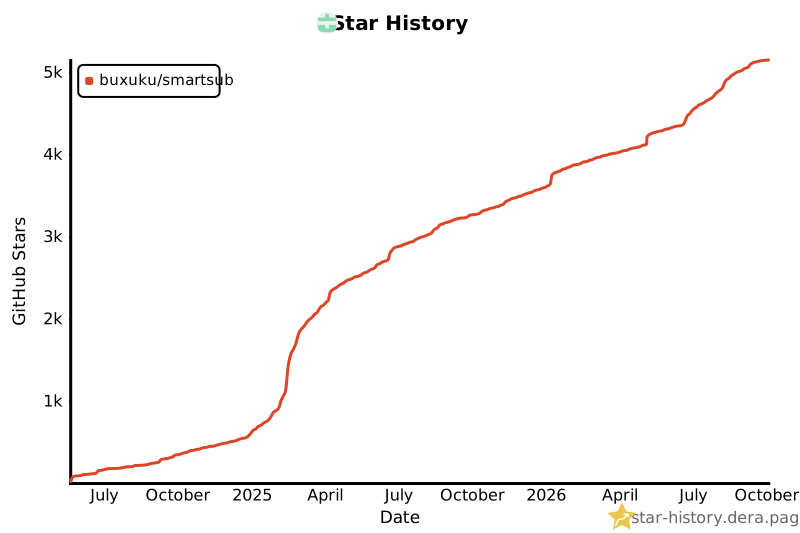
## Star History
[](https://star-history.dera.page/#buxuku/SmartSub&type=Date)