# ccglass
**Repository Path**: woohello/ccglass
## Basic Information
- **Project Name**: ccglass
- **Description**: 王建硕的CCglass
- **Primary Language**: Unknown
- **License**: MIT
- **Default Branch**: main
- **Homepage**: None
- **GVP Project**: No
## Statistics
- **Stars**: 0
- **Forks**: 0
- **Created**: 2026-07-13
- **Last Updated**: 2026-07-13
## Categories & Tags
**Categories**: Uncategorized
**Tags**: None
## README
# ccglass
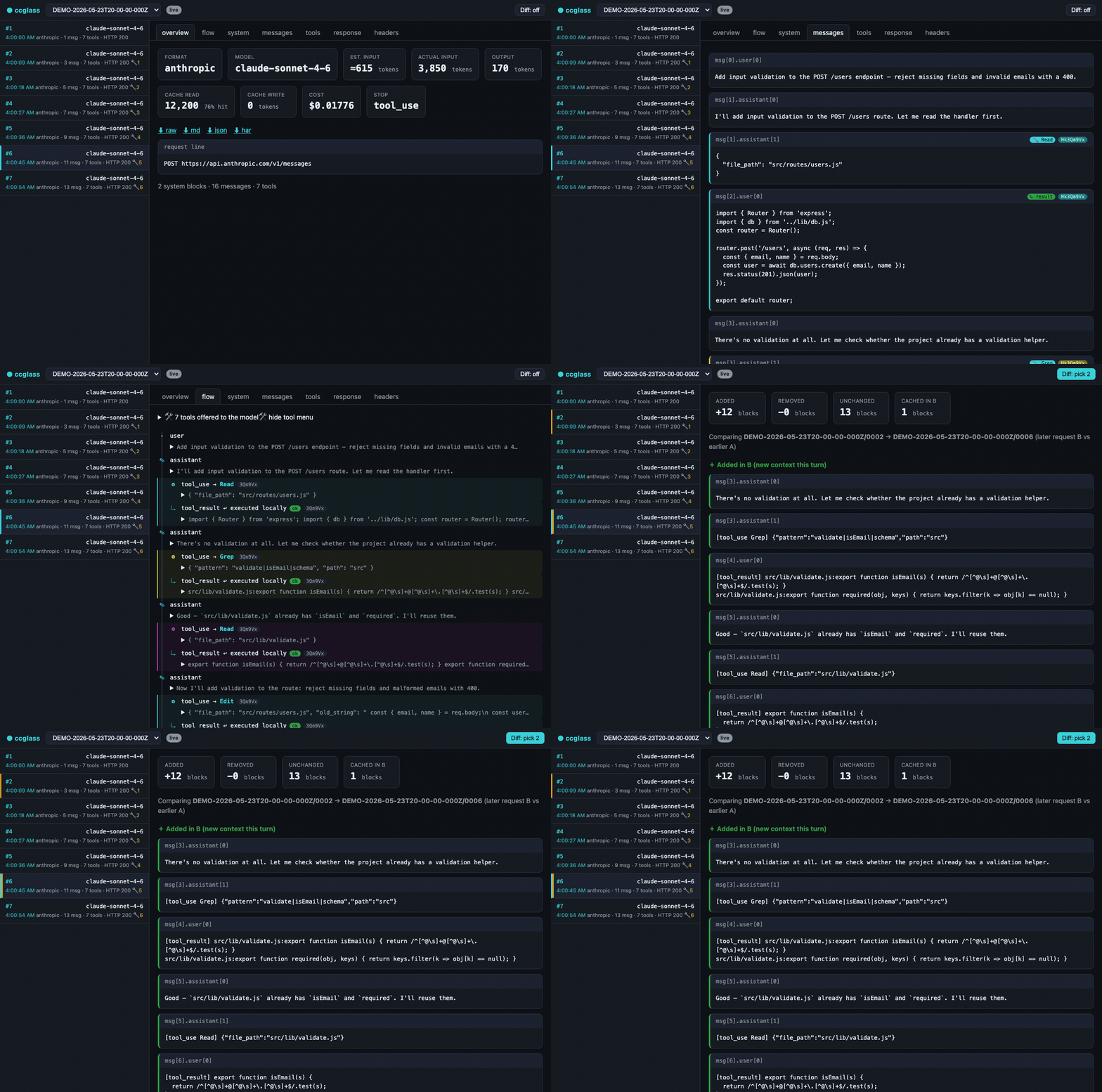
**See exactly what your coding agent sends to the model.** A lightweight
local logging reverse-proxy + web dashboard for **Claude Code, Codex,
OpenCode, DeepSeek-TUI, Reasonix, CodeBuddy, Kimi, Ollama, OpenRouter, and more**.
One command, like `ollama`:
```bash
npm install -g ccglass # or: brew install jianshuo/tap/ccglass
ccglass
```
Run with no arguments and `ccglass` asks which client to inspect:
```
Which client do you want to inspect?
1) Claude Code
2) Codex (OpenAI)
3) DeepSeek-TUI
4) Reasonix
5) Kimi (Moonshot, via Claude Code)
6) OpenCode
7) CodeBuddy (Tencent)
>
```
Or name it directly: `ccglass claude`, `ccglass codex`, `ccglass deepseek`,
`ccglass deepseek-tui`, `ccglass reasonix`, `ccglass dsnix`, or `ccglass kimi`.
`ccglass` starts a proxy, points the client at it via the right base-URL env var,
launches it for you, and opens a dashboard where you watch every request in real
time — the full system prompt, every tool schema, the message history,
token/cache/cost numbers, and a turn-to-turn diff.
```
● ccglass watching Codex (OpenAI) → https://api.openai.com
dashboard: http://127.0.0.1:57633
```
## Why
These CLIs are Node/native apps that **ignore `HTTP_PROXY`/`HTTPS_PROXY`** — so
Charles/mitmproxy never see the traffic, and `fetch`-patching tools break across
updates. `ccglass` sidesteps all of it: the client does the HTTPS to the real API
itself; you only intercept the plain HTTP hop to localhost. No CA certs, no TLS
pinning.
## Providers
| `ccglass ` or `--provider` | Wraps | Env var | Upstream | Format |
|---|---|---|---|---|
| `claude` | Claude Code | `ANTHROPIC_BASE_URL` | api.anthropic.com | Anthropic Messages |
| `codex` | Codex | `OPENAI_BASE_URL` | api.openai.com | OpenAI Responses / Chat |
| `deepseek` | DeepSeek-TUI dispatcher | `DEEPSEEK_BASE_URL` | api.deepseek.com | OpenAI Chat |
| `deepseek-tui` | DeepSeek-TUI runtime | `DEEPSEEK_BASE_URL` | api.deepseek.com | OpenAI Chat |
| `reasonix` | Reasonix | `DEEPSEEK_BASE_URL` | api.deepseek.com | OpenAI Chat |
| `dsnix` | Reasonix (`dsnix` alias) | `DEEPSEEK_BASE_URL` | api.deepseek.com | OpenAI Chat |
| `kimi` | Claude Code → Moonshot | `ANTHROPIC_BASE_URL` | api.moonshot.ai/anthropic | Anthropic Messages |
| `opencode` | OpenCode | `OPENAI_BASE_URL` | auto (from env) | OpenAI Chat |
| `qoder` | Qoder | `OPENAI_BASE_URL` | auto (from env) | OpenAI Chat |
| `ollama` | any Ollama-backed client | `OPENAI_BASE_URL` | 127.0.0.1:11434 | OpenAI Chat |
| `lmstudio` | any LM Studio-backed client | `OPENAI_BASE_URL` | 127.0.0.1:1234 | OpenAI Chat |
| `openrouter` | any OpenRouter-backed client | `OPENAI_BASE_URL` | openrouter.ai/api | OpenAI Chat |
| `glm` | any GLM/Zhipu-backed client | `OPENAI_BASE_URL` | auto (from env) | OpenAI Chat |
| `bedrock` | Claude Code → AWS Bedrock | `ANTHROPIC_BEDROCK_BASE_URL` | auto (from env) | Anthropic Messages |
| `vertex` | Claude Code → Google Vertex AI | `ANTHROPIC_BASE_URL` | auto (from env) | Anthropic Messages |
| `codebuddy` | CodeBuddy (IDE / VS Code / JetBrains) | forward-proxy | copilot.tencent.com | OpenAI Chat |
| `run --provider
-- ` | any client | per provider | per provider | per provider |
**Notes by provider:**
- **Codex** — captures traffic when Codex is in **API-key mode** (`OPENAI_API_KEY`). If Codex is authenticated via **ChatGPT login**, it uses a WebSocket transport (`wss://chatgpt.com/...`) that bypasses `OPENAI_BASE_URL` — the dashboard will be empty. Run `codex doctor` to check your auth mode; if it shows `auth mode: chatgpt`, switch to API-key mode to use ccglass.
- **Kimi** — runs through Claude Code against Moonshot's Anthropic-compatible endpoint; set `ANTHROPIC_AUTH_TOKEN` to your Moonshot key.
- **DeepSeek-TUI** — OpenAI-compatible Chat Completions; set `DEEPSEEK_API_KEY`.
- **Reasonix** — OpenAI-compatible Chat Completions; set `DEEPSEEK_API_KEY`.
- **OpenCode** — auto-detects upstream from `OPENAI_BASE_URL`; set it before running. Use `--env-var` if your OpenCode provider uses a different env var name.
- **Qoder** — OpenAI-compatible; pass `--upstream ` to point at your Qoder endpoint (e.g. `ccglass qoder --upstream https://your-qoder-endpoint.com`).
- **Ollama / LM Studio** — no key needed for local models; pass `--upstream` if your server runs on a non-default address.
- **OpenRouter** — set `OPENAI_API_KEY` to your OpenRouter key.
- **GLM/Zhipu** — set `OPENAI_BASE_URL` to your Zhipu endpoint (e.g. `https://open.bigmodel.cn/api/paas/v4`) and `OPENAI_API_KEY` to your Zhipu key.
- **AWS Bedrock** — set `ANTHROPIC_BEDROCK_BASE_URL` to your Bedrock endpoint before running. Claude Code in Bedrock mode reads its endpoint from this var (not `ANTHROPIC_BASE_URL`). Works against Bedrock-compat gateways (bearer / mTLS auth). Direct AWS endpoints (`*.amazonaws.com`) will fail through the proxy because SigV4 signs the Host header — ccglass prints a warning if it detects this.
- **Google Vertex AI** — set `ANTHROPIC_BASE_URL` to your Vertex AI endpoint (e.g. `https://us-east5-aiplatform.googleapis.com`) before running; GCP credentials are forwarded as-is.
- **CodeBuddy** — uses a **forward-proxy** mode (HTTP CONNECT + TLS MITM) because CodeBuddy's built-in models hardcode their upstream URL. See [CodeBuddy setup](#codebuddy) below.
### Custom provider recipe
Any tool that reads a base-URL env var can be inspected with the generic escape hatch:
```bash
# OpenAI-compatible tool with a custom endpoint
ccglass run \
--upstream https://my.custom.api/v1 \
--env-var MY_CUSTOM_BASE_URL \
-- my-tool [args...]
# Shorthand alias
ccglass run --base-url https://my.custom.api/v1 --env-var MY_BASE_URL -- my-tool
# Reuse an existing provider's format but point at a different upstream
ccglass run --provider openai --upstream https://my.openai-compat.api -- my-tool
```
## IDE Support (Cursor, Cline, Continue…)
IDE extensions that let you configure a **custom API base URL** (e.g. Cursor in BYOK mode, Cline, Continue.dev, Copilot Chat with custom models) can be inspected with the `proxy` subcommand — it starts the proxy + dashboard **without spawning any child process**:
```bash
ccglass proxy --provider openai # OpenAI-compatible IDEs (Cursor, Cline, Continue…)
ccglass proxy --provider claude # Anthropic-compatible IDEs
```
Output:
```
● ccglass proxy → https://api.openai.com
Set your IDE's API base URL to: http://127.0.0.1:PORT
dashboard: http://127.0.0.1:DASHPORT
(Ctrl-C to stop)
```
Point your IDE's API base URL at the printed proxy address, then open the dashboard URL to watch every request in real time.
**Limitation:** This only works when the IDE is configured to use *your own API key* with a custom base URL (BYOK mode). Cursor's built-in subscription models route through Cursor's own backend (`api2.cursor.sh`) and cannot be intercepted this way.
## CodeBuddy
CodeBuddy (Tencent) uses built-in models whose API endpoint (`copilot.tencent.com`) is hardcoded — it cannot be redirected via environment variables. ccglass uses a **forward-proxy** mode to intercept these requests: it accepts HTTP CONNECT tunnels, performs TLS MITM on targeted hosts only, and forwards the decrypted traffic to the real upstream.
This works with **CodeBuddy IDE**, **VS Code plugin**, **JetBrains plugin**, and **Visual Studio plugin** — any form factor that supports HTTP proxy settings.
### Quick start
```bash
ccglass codebuddy
```
Output:
```
● ccglass forward-proxy watching CodeBuddy (Tencent)
proxy: http://127.0.0.1:9999
dashboard: http://127.0.0.1:56181
intercepting: copilot.tencent.com
Add to your client settings:
"http.proxy": "http://127.0.0.1:9999"
"http.proxyStrictSSL": false
Press Ctrl-C to stop.
```
### Configure your IDE
**CodeBuddy IDE / VS Code plugin** — open `settings.json` (`Cmd+,` or `Ctrl+,`, then "Open Settings (JSON)") and add:
```json
{
"http.proxy": "http://127.0.0.1:9999",
"http.proxyStrictSSL": false
}
```
**JetBrains plugin** — go to *Settings → Appearance & Behavior → System Settings → HTTP Proxy*, select *Manual proxy configuration*, and set Host: `127.0.0.1`, Port: `9999`.
**Visual Studio plugin** — go to *Tools → Options → Environment → Network*, configure the proxy address.
> Use the port number from the `ccglass codebuddy` output (or fix it with `--proxy-port 9999`).
### How it works
```
CodeBuddy → http.proxy → ccglass forward-proxy (CONNECT + TLS MITM)
│
├─ intercept & log POST /v2/chat/completions
│
└─ forward → copilot.tencent.com:443
```
- Only `copilot.tencent.com` traffic is intercepted; all other HTTPS traffic (npm, git, etc.) passes through transparently without decryption.
- A local CA certificate is auto-generated on first run (stored in the session directory). Setting `http.proxyStrictSSL: false` tells the IDE to accept it without system-level trust.
- Request bodies are gzip-compressed by CodeBuddy; ccglass decompresses them for display in the dashboard.
### Cleanup
When you're done, remove the proxy settings from your IDE and press `Ctrl-C` to stop ccglass. Your captured logs remain available via `ccglass view`.
## What you get
- **Live request stream** — every call appears instantly; click to expand the
system prompt, messages, and tools with all escaped strings unescaped. Long
blocks fold behind a show/hide toggle; each row shows its timestamp and a
tool-call count.
- **Conversation flow** — a top-to-bottom sequence diagram of the agent loop:
which tool the model picked from the menu, how it ran locally, and how the
result was fed back. `tool_use` and `tool_result` are paired by `call_id` and
color-coded; skill calls are flagged.
- **Turn-to-turn diff** — pick two requests, see exactly what context was added
this turn and which blocks carry a cache breakpoint.
- **Token / cache / cost** — exact input/output/cache tokens from the response
`usage`, cache-hit rate, and estimated USD per request (per-provider pricing).
- **Response reassembly + export** — streamed SSE rebuilt into the final message
(`stop_reason`, tool calls, usage), for both the Anthropic and OpenAI wire
formats; export any request to a readable **raw** HTTP transcript, Markdown,
JSON, or HAR.
- **Session summary** — for the selected session, the header shows rolled-up input
and output tokens, cache-hit %, and estimated cost.
- **Per-model filter** — scope the request list, session summary, errors count,
and latency trend to one model from the session (**All models** by default),
including models seen on failed requests.
- **Per-request latency** — end-to-end time on each list row; Overview also shows
total time, TTFT, generation window, and approximate input/output tok/s.
- **Latency trend** — sparkline above the request list (avg / max per session).
- **Copy as cURL** — from the Overview tab, copy a shell-ready replay of the
proxied request.
- **Light / dark theme** — **System**, **Light**, or **Dark** in the header;
choice is saved in the browser.
- **Self-inspection (MCP)** — when wrapping Claude Code, ccglass registers its
own query tools so the agent can inspect the very requests it just made, right
inside the chat (`--no-mcp` to skip).
## Usage
```bash
ccglass # pick a client interactively
ccglass claude [args...] # inspect Claude Code (args pass through, e.g. --resume)
ccglass codex [args...] # inspect Codex
ccglass deepseek [args...] # inspect DeepSeek-TUI (dispatcher)
ccglass deepseek-tui [args...] # inspect DeepSeek-TUI runtime directly
ccglass reasonix [args...] # inspect Reasonix
ccglass dsnix [args...] # inspect Reasonix (dsnix alias)
ccglass kimi [args...] # inspect Kimi (via Claude Code)
ccglass opencode [args...] # inspect OpenCode (auto-detects upstream from OPENAI_BASE_URL)
ccglass codebuddy # inspect CodeBuddy (forward-proxy mode)
ccglass run --provider openai -- # inspect any client
ccglass proxy --provider openai # proxy only — point your IDE at the proxy URL
ccglass view # re-open the dashboard over saved logs (global + ./.ccglass)
ccglass migrate # copy this project's ./.ccglass into the global store
ccglass repack [session] # force-migrate existing captures to content-addressed (v2) format
ccglass rm # delete a session and reclaim its orphaned blobs
ccglass usage [--by-session|--by-timestamp] [--format json] # token + USD rollup; lists each session
ccglass export / --format raw|md|json|har # e.g. 2026-05-25T12-00-00-000Z/0003
```
With `--by-session`, each row is labelled by the agent's own session name when it
can be recovered — Claude Code's `/rename` title, else its auto-generated title,
else the first prompt — falling back to the capture timestamp otherwise. Use
`--by-timestamp` to label rows by the raw capture-timestamp id instead (handy for
`ccglass rm`/`export`, which take that id).
### Options
| Flag | Default | Meaning |
|---|---|---|
| `--provider
` | from command | Force format/env for `run` (`claude`/`codex`/`deepseek`/`reasonix`/`kimi`/`openai`) |
| `--upstream ` | per provider | Override the upstream API |
| `--port ` | auto | Dashboard port |
| `--proxy-port ` | auto | Proxy port |
| `--dir ` | `~/.ccglass/sessions/-` | Where new logs are written; also used as `migrate` destination. Dashboard still reads `./.ccglass` in the project. |
| `--no-open` | off | The dashboard opens in your browser by default; pass this to skip it |
| `--no-mcp` | off | Don't inject ccglass's self-inspection tools into Claude Code |
| `--no-settings-override` | off | Don't force Claude Code onto the proxy via `--settings` (for when a provider switcher set `ANTHROPIC_BASE_URL`) |
| `--no-redact` | off | Keep auth tokens unmasked in saved logs |
| `--env-var ` | per provider | Override the environment variable used to set the proxy URL |
## Logs & secrets
New captures are written under `~/.ccglass/sessions/`, one directory per project.
The folder name is the full resolved project path (slashes become `--`, Unicode
kept) plus a short hash suffix, for example:
`~/.ccglass/sessions/Users--you--Coding--ccglass-a1b2c3d4//NNNN.json`
While you inspect a client, the dashboard merges logs from that global directory
and from `./.ccglass` in the **current project** (if it still exists from older
runs). The first time ccglass sees `./.ccglass` with data but no logs in the new
global store yet, it prints a note suggesting `ccglass migrate`.
`ccglass migrate` copies `.json` files from **this project's** `./.ccglass` into
the store for the current directory (default: the global path above, or `--dir` if
you passed it). It skips files that already exist at the destination, only runs in
the current working directory, and exits with a clear message if there are no
`.json` logs to copy (empty session folders alone are not enough).
### Storage format
Captures are stored content-addressed (git-style): each message, the `tools`
array, and the `system` block are written once to `/blobs/` and referenced
by hash from per-request manifests. This keeps long sessions from growing
quadratically. Legacy captures are migrated to this format automatically the
first time they are read.
- `ccglass repack [session]` — force-migrate existing captures now.
- `ccglass rm ` — delete a session and reclaim its orphaned blobs.
Auth tokens (`authorization`, `x-api-key`) are **masked by default** — pass
`--no-redact` to keep them. Treat the log directory as sensitive regardless.
## Requirements
Node ≥ 18. The core proxy + dashboard have no runtime dependencies; the
optional MCP self-inspection feature (`ccglass claude`) pulls in
`@modelcontextprotocol/sdk` and `zod`.
## Issues
Open an [issue](https://github.com/jianshuo/ccglass/issues/new) and Claude picks
it up automatically — it investigates against the code, and if it's a real,
well-scoped bug or small feature, opens a fix PR that references your issue. Keep
iterating by commenting `@claude` on the issue or the PR. Claude only ever opens
PRs for review; a maintainer merges and releases.
## Acknowledgments
ccglass is better because of the people who took the time to open a PR. Thank you,
all of you. 🙏
**庄表伟 ([@zhuangbiaowei](https://github.com/zhuangbiaowei))** contributed
**first-class DeepSeek-TUI support** ([#1](https://github.com/jianshuo/ccglass/pull/1)).
DeepSeek-TUI ships as a dual-binary coding agent — a `deepseek` dispatcher and a
`deepseek-tui` runtime. 庄表伟 wired up both as native ccglass providers, pointing
them at the proxy via `DEEPSEEK_BASE_URL` and reusing the existing
OpenAI-compatible Chat Completions adapter, so every DeepSeek request now shows up
in the dashboard with zero extra setup. The contribution also added them to the
interactive picker, documented usage across the README, and shipped provider
regression tests to keep it working. Thank you for making ccglass better for the
whole DeepSeek community.
And huge thanks to everyone else who shipped improvements:
- **[@KorenKrita](https://github.com/KorenKrita)** — built the richer dashboard with
latency, theming, model filtering, and session stats
([#50](https://github.com/jianshuo/ccglass/pull/50)), added the **Reasonix** CLI
provider ([#49](https://github.com/jianshuo/ccglass/pull/49)), moved captured logs
into `~/.ccglass/sessions/` so they survive project-folder deletion
([#39](https://github.com/jianshuo/ccglass/pull/39)), and fixed a CLI crash when
`xdg-open` fails ([#12](https://github.com/jianshuo/ccglass/pull/12)).
- **Marcus ([@marcuslannister](https://github.com/marcuslannister))** — added the
token-usage summary across every session
([#48](https://github.com/jianshuo/ccglass/pull/48)) and fixed Bedrock interception
to key off `ANTHROPIC_BEDROCK_BASE_URL`
([#38](https://github.com/jianshuo/ccglass/pull/38)).
- **[@ivanberry](https://github.com/ivanberry)** — added the `--env-var` option and
**OpenCode** provider support
([#11](https://github.com/jianshuo/ccglass/pull/11)).
- **[@ping-coding](https://github.com/ping-coding)** — fixed Windows Codex proxy
routing ([#20](https://github.com/jianshuo/ccglass/pull/20)).
Thank you all. 🙏
## Related tools
| Tool | What it does |
|------|-------------|
| **ccglass** ← you are here | See exactly what your coding agent sends to the model |
| [**ccline**](https://github.com/jianshuo/ccline) | Type a thought at your zsh prompt — get an AI answer and run the command |
| [**cclight**](https://github.com/jianshuo/cclight) | MacBook notch glow tells you when Claude Code is thinking |
## Star History
## License
MIT