# SuperSQL
**Repository Path**: xml518/supersql-open
## Basic Information
- **Project Name**: SuperSQL
- **Description**: SuperSQL 是一个基于国内外先进生成式大模型实现Nl2SQL的Java框架,专注于将数据库表结构通过检索增强生成(RAG, Retrieval-Augmented Generation)技术进行训练,从而实现从自然语言文本到SQL查询的智能转换(Text to SQL)。该框架旨在简化复杂的数据库查询过程,使开发者和用户能够通过简单的自然语言描述获取所需数据。
- **Primary Language**: Java
- **License**: Apache-2.0
- **Default Branch**: master
- **Homepage**: http://www.ai-space.com.cn/
- **GVP Project**: No
## Statistics
- **Stars**: 0
- **Forks**: 119
- **Created**: 2025-07-19
- **Last Updated**: 2025-07-19
## Categories & Tags
**Categories**: Uncategorized
**Tags**: None
## README

Super SQL 1.0.0-M1
A Lightweight, Easy-to-Use, and Extensible SQL Generation Framework for Java!


---
### Introduction to SuperSQL
SuperSQL is a Java framework for NL2SQL (Natural Language to SQL) based on advanced generative large models from domestic and international sources. It focuses on transforming database schema into SQL queries using Retrieval-Augmented Generation (RAG) technology. This framework aims to simplify complex database query processes, allowing developers and users to retrieve required data through simple natural language descriptions.
#### Key Features:
- **Generative SQL**: Utilizes powerful generative large models to automatically convert natural language questions into precise SQL query statements.
- **RAG Training**: Deep learning training of database schema using RAG technology to improve the accuracy and efficiency of SQL generation.
- **Type Safety & Easy to Use**: Combines Java generics to ensure compile-time type checking, while providing a simple and intuitive API design that is easy to integrate into existing projects.
- **Multi-Database Support**: Compatible with multiple mainstream database systems to meet the needs of different application scenarios.
- **Performance Optimization**: Carefully designed and optimized to ensure efficient execution while maintaining good readability.
SuperSQL is suitable for developers who want to quickly and securely perform complex database operations in Java applications and wish to leverage AI capabilities through natural language processing technology.
---
### How SuperSQL Works
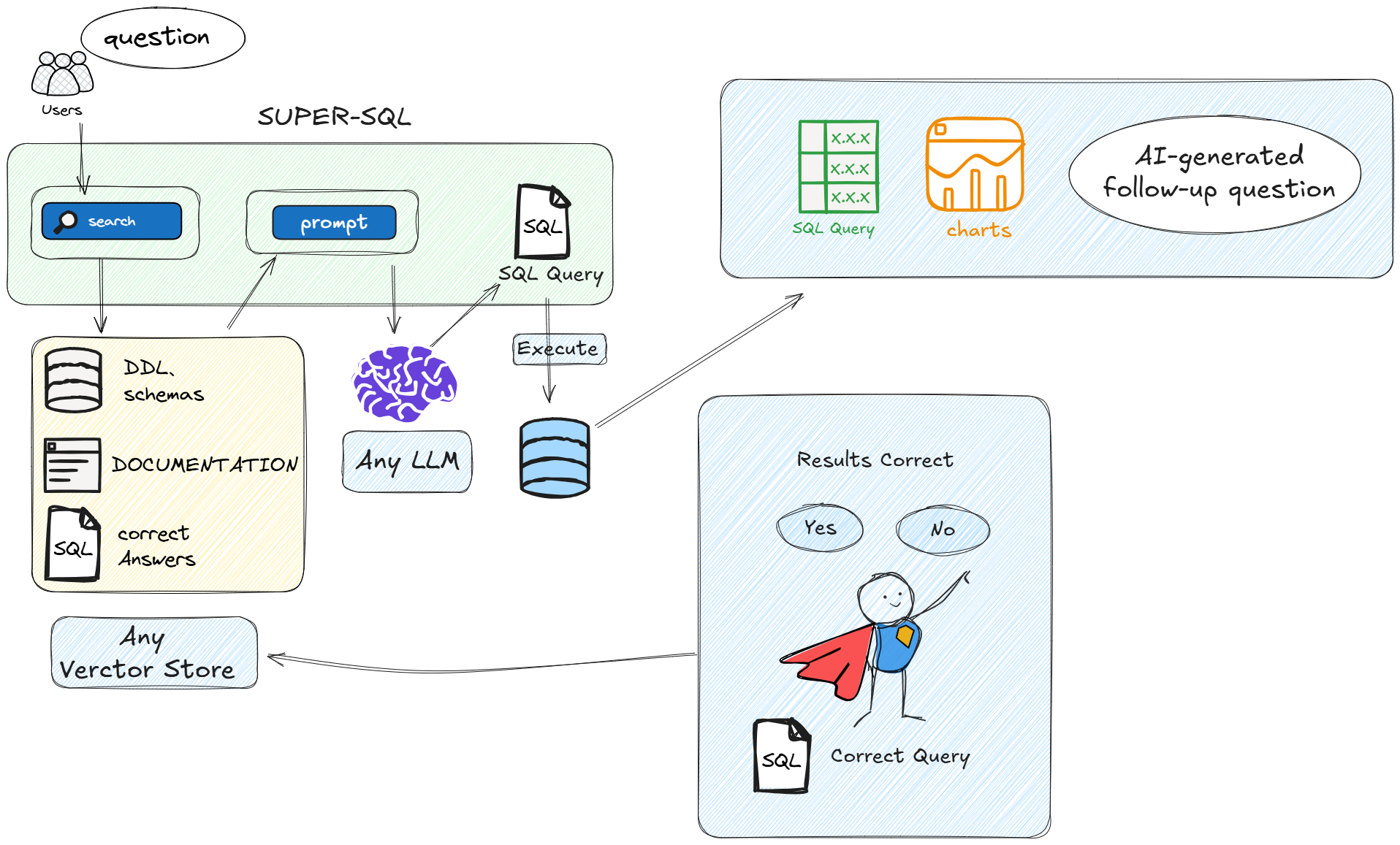
SuperSQL is based on **RAG** technology. It uses retrieval-augmented generation to train on database schema and achieve intelligent conversion from natural language text to SQL queries.
---
### Quick Start
#### Maven Dependency
To use SuperSQL, add the following Maven dependency to your [pom.xml](file://D:\IronGuo\open\super-sql\pom.xml):
```xml
com.aispace.supersql
super-sql-spring-boot-starter
1.0.0-M1
```
#### Configuration
Set the `init-train` configuration item in your [application.yml](file://D:\IronGuo\open\super-sql\super-sql-console\src\main\resources\application.yml). The default value is `false`, meaning no training is performed. If set to `true`, it will automatically train based on the database connection configuration.
```yaml
super-sql:
init-train: false
```
---
### Large Language Model Configuration
#### Azure OpenAI
Add the Azure OpenAI dependency:
```xml
org.springframework.ai
spring-ai-starter-model-azure-openai
```
Azure configuration in `application.yml`:
```yaml
ai:
azure:
openai:
api-key: xxxxxxxxxxxxxx
chat:
options:
deployment-name: gpt-4o-latest
endpoint: https://your-resource-name.openai.azure.com/
embedding:
options:
deployment-name: embedding-ada-002
```
Example usage:
```java
private final AzureOpenAiChatModel azureChatModel;
private final SpringSqlEngine sqlEngine;
private final SpringVectorStore store;
@GetMapping("getSuperSql")
public Object getSuperSql(@RequestParam String question) {
String sql = sqlEngine.setChatModel(azureChatModel)
.setOptions(RagOptions.builder()
.topN(5)
.rerank(false)
.limitScore(0.4)
.build())
.generateSql(question);
Object object = sqlEngine.executeSql(sql);
return object;
}
```
#### Enable ReRanker Re-ranking Configuration
```
spring:
ai:
# Re-ranking configuration. You can use the free trial on Gitee AI or deploy Xinference locally.
reranker:
enabled: true
model: Qwen3-Reranker-8B
baseUrl: https://ai.gitee.com/v1/rerank #http://localhost:9997/v1/rerank
api-key: xxxxxxxxxx
```
#### Ollama
Add the Ollama dependency:
```xml
org.springframework.ai
spring-ai-starter-model-ollama
```
Ollama configuration:
```yaml
spring:
ai:
ollama:
base-url: http://localhost:11434
chat:
options:
model: deepseek-r1:32b
temperature: 0.7
embedding:
options:
model: mxbai-embed-large
init:
pull-model-strategy: never
embedding:
additional-models:
- mxbai-embed-large
```
Example usage:
```java
private final OllamaChatModel chatModel;
private final SpringSqlEngine sqlEngine;
private final SpringVectorStore store;
@GetMapping("getSuperSql")
public Object getSuperSql(@RequestParam String question) {
String sql = sqlEngine.setChatModel(chatModel).generateSql(question);
Object object = sqlEngine.executeSql(sql);
return object;
}
```
---
### Vector Database Configuration
#### Chroma
Add the Chroma dependency:
```xml
org.springframework.ai
spring-ai-starter-vector-store-chroma
```
Start local Chroma using Docker:
```shell
docker run -it --rm --name chroma -p 8000:8000 ghcr.io/chroma-core/chroma:1.0.0
```
#### Other Supported Vector Databases
Refer to [Spring AI Vector Databases](https://docs.spring.io/spring-ai/reference/1.0/api/vectordbs.html)
---
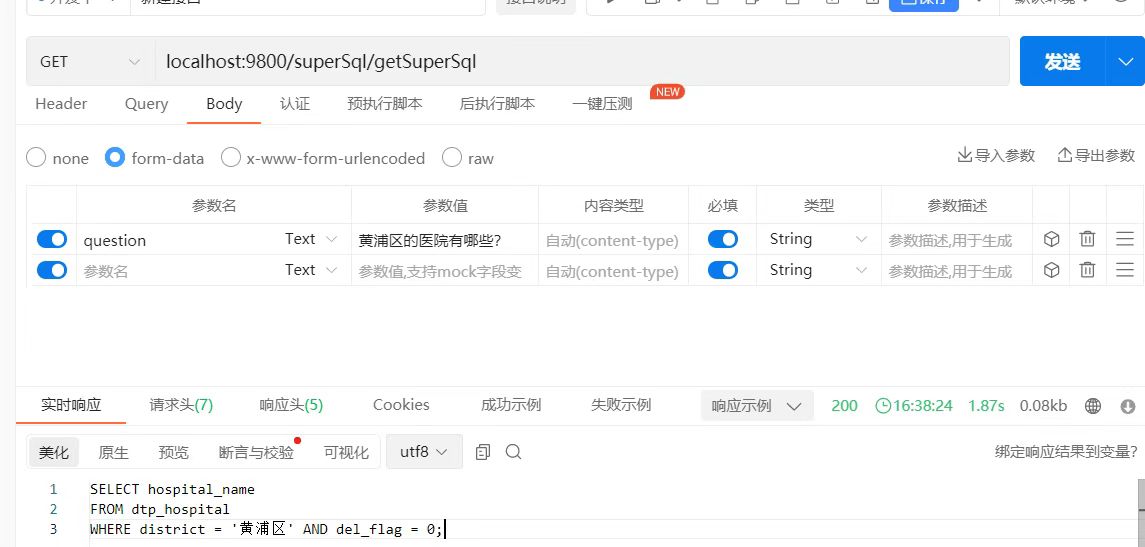
### Example Response
---
### Custom Training
#### Train with DDL Statements
```java
@GetMapping("trainDdl")
public String trainDDl() {
String ddl = """
CREATE TABLE `dtp_hospital` (
...
) ENGINE = INNODB ...;
""";
sqlEngine.setChatModel(azureChatModel).train(TrainBuilder.builder().content(ddl).policy(TrainPolicyType.DDL).build());
return "successful training";
}
```
#### Train with Specific SQL
```java
@GetMapping("trainSql")
public String trainSql() {
String sql="SELECT * FROM DTP_HOSPITAL WHERE DISTRICT LIKE '%Huangpu%';";
String question="Which hospitals are in Huangpu District?";
sqlEngine.setChatModel(azureChatModel).train(TrainBuilder.builder().content(sql).question(question).policy(TrainPolicyType.SQL).build());
return "successful training";
}
```
---
### Launch SuperSQL Console
Start the `super-sql-console` Spring Boot project.
Import the `super-sql-ui` project into VSCode:
```bash
npm install
npm run dev
```
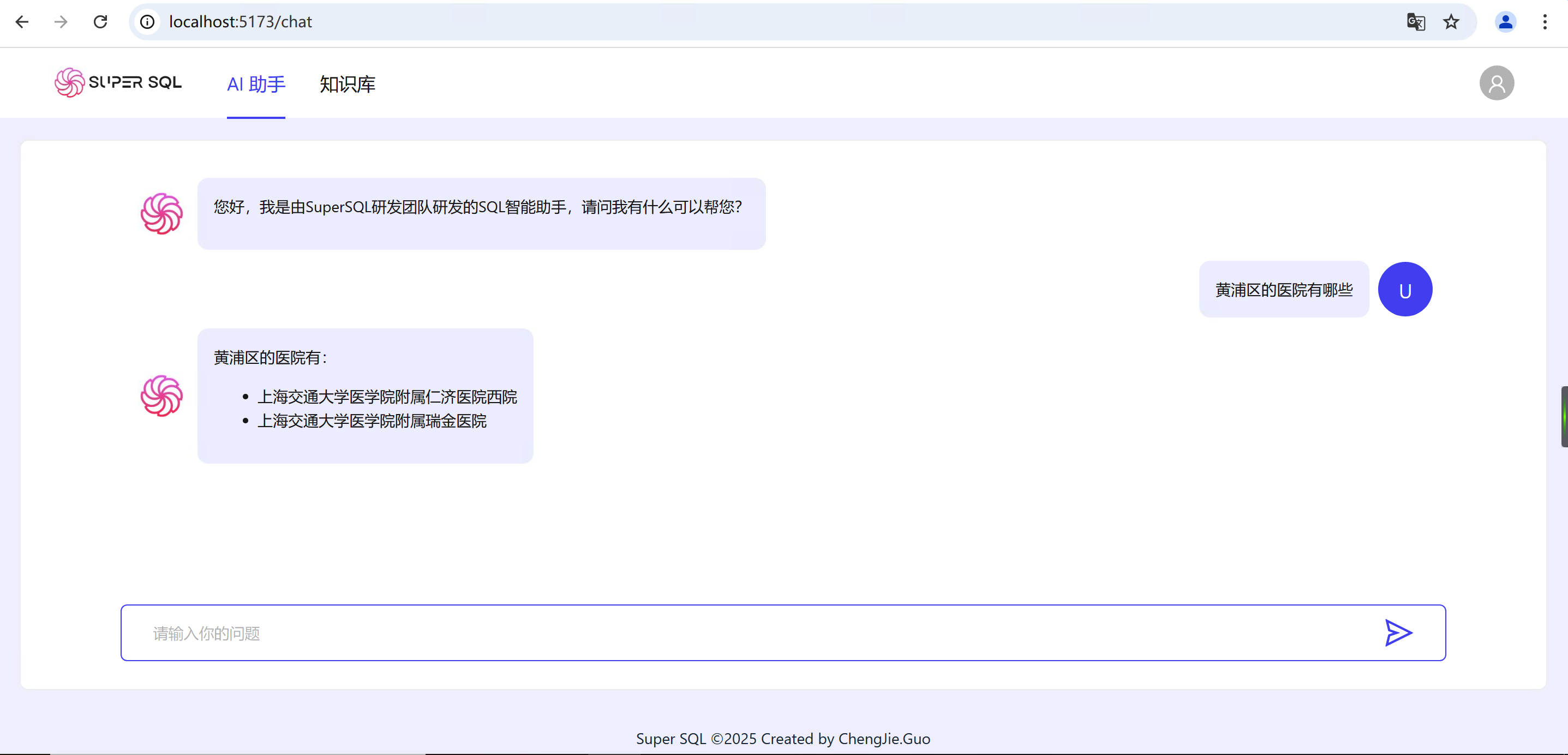
Visit: [http://localhost:5173/chat](http://localhost:5173/chat)
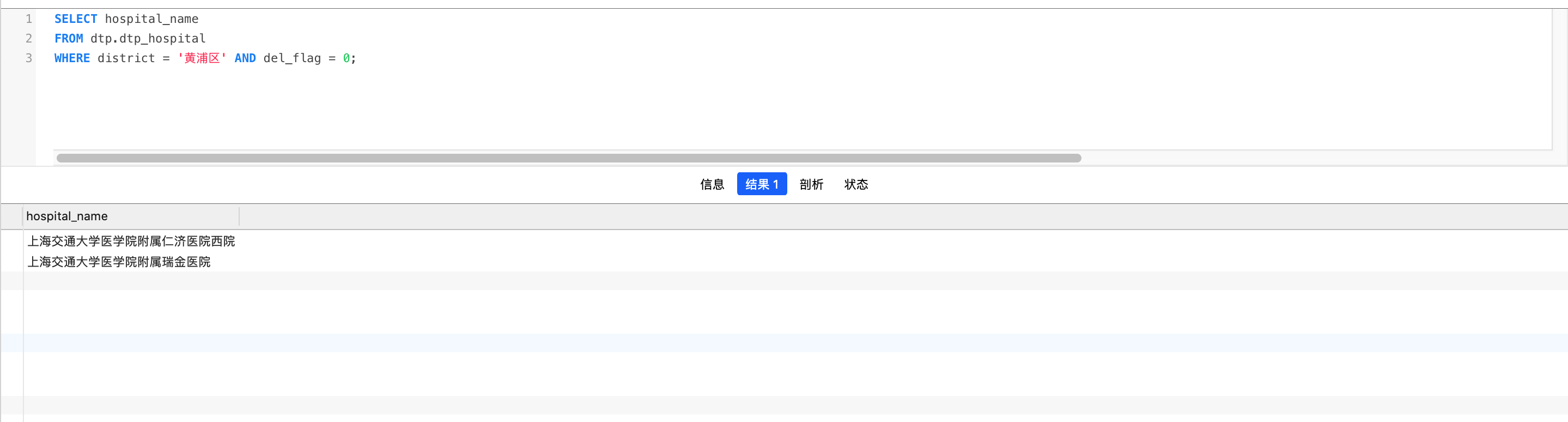
Result in the database:
---
### Official Documentation
Visit: [http://www.ai-space.com.cn/](http://www.ai-space.com.cn/)
### Reference Documentation
Spring-AI Official Documentation: [https://docs.spring.io/spring-ai/docs/getting-started](https://docs.spring.io/spring-ai/docs/getting-started)
### Links
- [Spring-AI](https://spring.io/projects/spring-ai): Spring AI is an application framework for AI engineering. Its goal is to apply Spring ecosystem design principles (such as portability and modular design) to the AI field and promote the use of POJOs as building blocks for AI applications.
---
### Source Code
- Gitee: [https://gitee.com/guocjsh/super-sql](https://gitee.com/guocjsh/super-sql)
- GitHub: [https://github.com/guocjsh/SuperSQL](https://github.com/guocjsh/SuperSQL)
- GitCode: [https://gitcode.com/GuoChengJie/SuperSQL](https://gitcode.com/GuoChengJie/SuperSQL)