# AgentsMesh
**Repository Path**: yangming886/AgentsMesh
## Basic Information
- **Project Name**: AgentsMesh
- **Description**: No description available
- **Primary Language**: Unknown
- **License**: Not specified
- **Default Branch**: main
- **Homepage**: None
- **GVP Project**: No
## Statistics
- **Stars**: 0
- **Forks**: 0
- **Created**: 2026-04-16
- **Last Updated**: 2026-06-26
## Categories & Tags
**Categories**: Uncategorized
**Tags**: None
## README

Where teams scale beyond headcount.
The AI Agent Workforce Platform.
Run a hundred AI agents across your own machines — and command them all from one console.
Website ·
Docs ·
Quick Start ·
Discord ·
X · X (founder) ·
LinkedIn



---
## The problem: one operator, a hundred agents
AI coding agents have made individual engineers wildly productive — but individual productivity has a ceiling. The next 10x isn't a smarter agent; it's **running many agents at once**, and directing them like a team.
That ambition breaks the moment you try it for real:
- A hundred agents won't fit on one laptop.
- Nobody can babysit a hundred terminals.
- Each agent needs its own clean, isolated workspace — or they corrupt each other's state.
- Long-running agents stall, get stuck, and silently die.
- Agents working in isolation never compound into a team.
What's missing isn't the agent. It's the **control layer** that turns one operator into the director of an agent workforce — the layer that schedules agents onto machines, isolates them, keeps them alive, lets them collaborate, and puts all of it on one screen.
**AgentsMesh is that layer.**
## From problem to platform
Every part of AgentsMesh exists to answer one question: *how does a single person reliably run, watch, and steer a hundred agents?* Each capability is the direct answer to a wall you hit when you scale.
| The wall you hit | What AgentsMesh gives you |
|---|---|
| 100 agents won't run on one machine | **Runner fleet** — install self-hosted runners across any number of machines. Each advertises its capacity (`max_concurrent_pods`), and agents are scheduled onto the runner you pick or an available one from the pool. Your code never leaves your infrastructure. |
| Every agent needs a clean, isolated environment | **Workspace isolation** — each agent runs in its own pod with a dedicated Git worktree sandbox (`sandboxes/{pod}/workspace/`), private credentials, and its own branch. Concurrent agents never step on each other. |
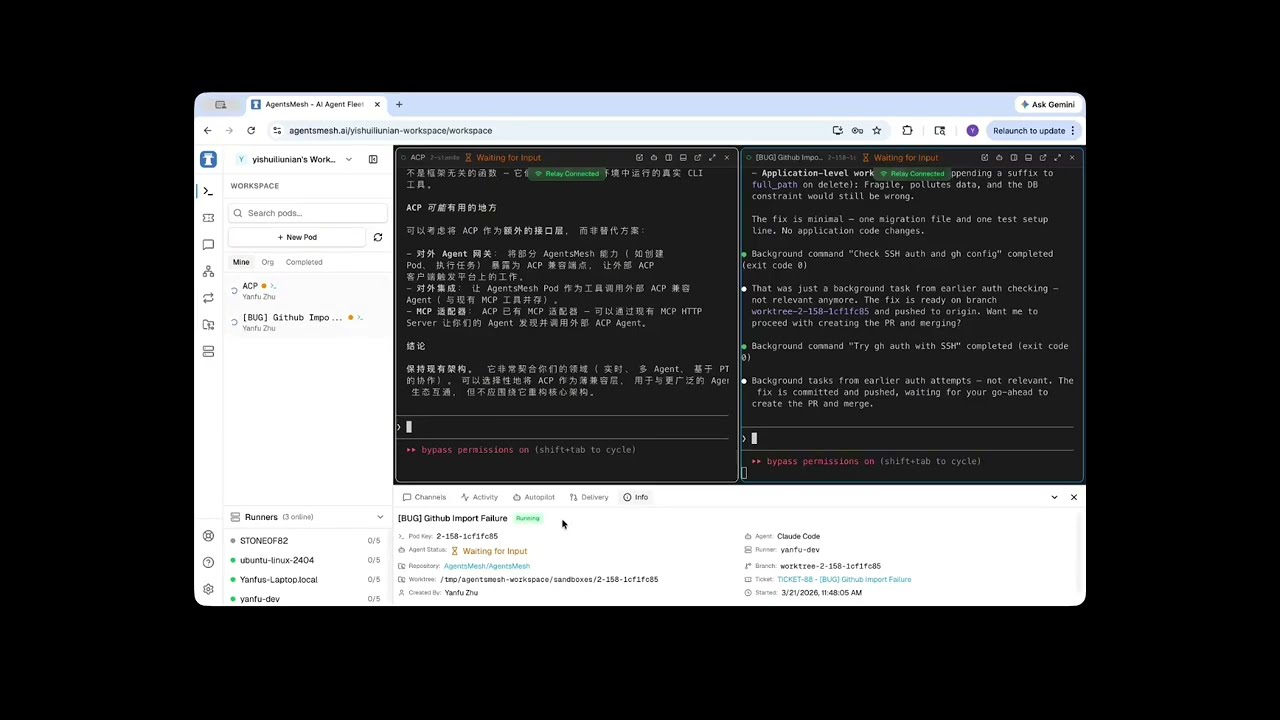
| You can't watch a hundred terminals | **One console, every screen** — Web, Desktop (Electron), and iOS (SwiftUI) clients, all driven by the *same* Rust core. Paginated pod sidebar, multi-pane workspace, and real-time terminal streaming let one person hold many agents in view. |
| Long-running agents stall and need babysitting | **Autopilot** — a control agent watches a pod and sends the next instruction the moment it goes idle, with iteration caps, decision history, and human takeover/handback. Self-healing, unattended runs. |
| Agents working alone don't compound | **Mesh & Channels** — bind pods together, let them talk over channels with `@mentions`, and watch the collaboration topology update in real time. |
The rest is plumbing built so that chain holds up under load: a **control-plane / data-plane split** — orchestration over gRPC with mTLS, terminal bytes over a stateless Relay cluster — so the backend never bottlenecks on PTY traffic, no matter how many agents are streaming at once.
## Core concepts
- **AgentPod** — one agent's isolated execution environment: a PTY terminal, a Git worktree sandbox, and a real-time output stream.
- **Runner** — a self-hosted daemon you install on your own machines. It connects to the backend over gRPC+mTLS and spawns pods. Register as many as you need; pods schedule across the fleet.
- **Workspace** — the per-pod sandbox: an isolated Git worktree plus private credentials, so concurrent agents never collide and every run is recoverable.
- **Autopilot** — autonomous, self-healing control of a pod by a *control agent*, with iteration limits, decision history, and human takeover at any point.
- **Mesh & Channel** — the collaboration fabric: pods bound into a topology, communicating over channels with `@mentions`.
- **Ticket** — a unit of work on a Kanban board, bindable to a pod with progress and MR/PR tracking.
## Architecture
AgentsMesh separates the **control plane** from the **data plane**: orchestration commands travel over gRPC with mTLS, while terminal I/O streams through a stateless Relay cluster. The backend never touches a single PTY byte — which is what lets the fleet scale.

**Server-side (Go)**
| Component | Role |
|-----------|------|
| **Backend** | API server (Gin + GORM) — auth, org/team/user, pod lifecycle, tickets, billing, and the PKI that issues runner certs |
| **Relay** | WebSocket relay for the terminal data plane — low-latency pub/sub between runners and clients |
| **Runner** | Self-hosted daemon — connects to the backend (gRPC+mTLS), spawns isolated PTY pods that run the actual agents |
**Client-side**
| Component | Role |
|-----------|------|
| **Rust Core** | Business-logic SSOT — 10 crates compiled to WASM (web/desktop) and a native dylib via UniFFI (iOS). One cache, one set of services, every client. |
| **Web** | Next.js console — terminal, Kanban, real-time mesh topology |
| **Desktop** | Electron app — reuses the web UI, talks to a native Rust core over NAPI |
| **iOS** | SwiftUI + TCA — the same Rust core via UniFFI bindings |
| **Web-Admin** | Internal admin console — user/org/runner management, audit logs |
## Getting Started
The fastest way to use AgentsMesh is the hosted service at **[agentsmesh.ai](https://agentsmesh.ai)** — sign up, connect your Git provider, and start running agents in minutes. Bring your own AI API keys (**BYOK**): no usage caps, full cost control.
### 1. Install a Runner
The Runner is a lightweight daemon that runs on your machine and executes AI agents locally. Your code stays on your infrastructure. Install one per machine you want in the fleet.
```bash
curl -fsSL https://agentsmesh.ai/install.sh | sh
```
> See the [Runner README](runner/) for more installation options (deb, rpm, Windows, etc.)
### 2. Login
```bash
agentsmesh-runner login
```
This opens your browser to authenticate. For headless environments (SSH, remote server):
```bash
agentsmesh-runner login --headless
```
For self-hosted deployments, add `--server`:
```bash
agentsmesh-runner login --server https://your-server.com
```
### 3. Run
```bash
agentsmesh-runner run
```
Or install as a system service for always-on operation:
```bash
agentsmesh-runner service install
agentsmesh-runner service start
```
Once the runner is online, create an **AgentPod** from any console (Web / Desktop / iOS) and start putting agents to work.
## Quick Start
Run the whole stack locally with one command.
```bash
git clone https://github.com/AgentsMesh/AgentsMesh.git
cd AgentsMesh/deploy/dev
./dev.sh
```
This starts the full stack: PostgreSQL, Redis, MinIO, Backend, Relay, Traefik, and a local Next.js frontend with hot reload.
**Access:**
| Service | URL |
|---------|-----|
| Web Console | http://localhost:3000 |
| API | http://localhost:80/api |
**Test Accounts:**
| Role | Email | Password |
|------|-------|----------|
| User | dev@agentsmesh.local | devpass123 |
| Admin | admin@agentsmesh.local | adminpass123 |
> Ports are dynamically allocated per worktree. Check `deploy/dev/.env` for actual values.
Manual Setup
**Prerequisites:** Go 1.24+, Node.js 20+, pnpm, Docker
```bash
# 1. Start infrastructure
cd deploy/dev && ./dev.sh
# 2. Backend (auto-starts in Docker with hot reload)
docker compose logs -f backend
# 3. Frontend (local with Turbopack)
cd clients/web && pnpm install && pnpm dev
```
Production Deployment
Docker images are published to Docker Hub on every push to `main`:
```
agentsmesh/backend:sha-xxxxxxx
agentsmesh/web:sha-xxxxxxx
agentsmesh/web-admin:sha-xxxxxxx
agentsmesh/relay:sha-xxxxxxx
```
Tagged releases (`v*`) get semver tags:
```
agentsmesh/backend:1.0.0
agentsmesh/backend:1.0
```
See [deploy/selfhost/](deploy/selfhost/) for the self-hosted deployment guide.
## Supported Agents
Any terminal-based agent works. The built-ins:
| Agent | Provider | Description |
|-------|----------|-------------|
| [Claude Code](https://docs.anthropic.com/en/docs/agents-and-tools/claude-code/overview) | Anthropic | Autonomous AI coding agent |
| [Codex CLI](https://github.com/openai/codex) | OpenAI | OpenAI's code generation CLI |
| [Gemini CLI](https://github.com/google-gemini/gemini-cli) | Google | Google Gemini CLI |
| [Aider](https://github.com/Aider-AI/aider) | Open Source | AI pair programming in the terminal |
| [OpenCode](https://github.com/opencode-ai/opencode) | Open Source | Open source AI coding tool |
| Custom | Any | Any terminal-based agent |
## Tech Stack
| Layer | Technology |
|-------|-----------|
| Backend | Go (Gin + GORM) |
| Client Core | Rust → WASM (web/desktop) + UniFFI (iOS) — shared business logic |
| Web / Desktop | Next.js (App Router) + TypeScript + Tailwind · Electron |
| iOS | SwiftUI + TCA |
| Database | PostgreSQL + Redis |
| Storage | MinIO (S3-compatible) |
| API | REST + gRPC (bidirectional streaming) |
| Security | mTLS for runner connections, JWT for web auth |
| Real-time | gRPC streaming (Runner ↔ Backend), WebSocket (Relay ↔ Client) |
| Reverse Proxy | Traefik |
## Project Structure
```
AgentsMesh/
├── backend/ # Go API server
├── relay/ # Terminal relay server (Go)
├── runner/ # Self-hosted runner daemon (Go)
├── clients/
│ ├── core/ # Rust business-logic SSOT (WASM + UniFFI)
│ ├── web/ # Next.js console
│ ├── web-admin/ # Admin console (Next.js)
│ ├── desktop/ # Electron desktop app
│ └── ios/ # SwiftUI + TCA iOS app
├── proto/ # Protocol Buffers definitions
├── deploy/
│ ├── dev/ # Docker Compose dev environment
│ └── selfhost/ # Self-hosted deployment guide
└── docs/ # Architecture docs and RFCs
```
## Contributing
We welcome contributions! See [CONTRIBUTING.md](CONTRIBUTING.md) for guidelines.
- [Code of Conduct](CODE_OF_CONDUCT.md)
- [Security Policy](SECURITY.md)
## License
[Business Source License 1.1](LICENSE) (BSL-1.1)
- **Change Date:** 2030-02-28
- **Change License:** GPL-2.0-or-later
The BSL allows you to use, copy, and modify the software for non-production purposes. Production use requires a commercial license until the change date, after which the software becomes available under GPL-2.0-or-later. See [LICENSE](LICENSE) for the full terms and additional use grant.